स्थानीय दस्तावेज़ एआई
Extract document data using local AI with Ollama
के साथ शुरू
स्रोत दस्तावेज़

इसके लिए काम करें
Your local Ollama route
उदाहरण स्रोत
स्रोत दस्तावेज़
- Document type
- invoice, statement, form or report
- Suggested schema
- Named columns inferred from the file
- पंक्तियों
- Structured records for review
Model inference on your own computer.
 स्थानीय ओलामा
 स्थानीय ओलामा
Use local Ollama document extraction to turn PDFs, scans and images into fields and tables. Review the source, correct uncertain values and export Excel, CSV or JSON.
Ollama document parsing combines a local model with a workflow that prepares the source and organizes the response. Dynamite Docs uses embedded PDF text when available and a compatible vision model for scanned PDFs, photos and screenshots. The result contains fields and table rows you can check beside the original.
The Dynamite Docs Windows companion connects your browser workspace to local Ollama. Local inference sends document bytes from your browser to a service bound to loopback on your workstation. The companion prepares the request for Ollama and returns a validated extraction without calling an external model API. Use browser-only file storage when the source file should stay on your computer.
Local LLM support is available on Starter, Pro and Scale. Model inference runs on your hardware, while authentication, token issuance, account state and workspace services remain hosted.
Set up local extraction. Local Ollama requires Starter, Pro or Scale, a running companion, and a compatible vision model.
What runs where
- Browser workspace: Starts the extraction and displays the editable result.
- Signed local companion: Accepts authenticated requests on loopback port 8756.
- Ollama: Runs the selected local model through its OpenAI-compatible API.
- Hosted account service: Issues short-lived tokens and keeps plan and workspace state.
Extract PDF and image data to JSON with Ollama
Extracting PDFs and images to JSON with Ollama requires consistent field names and complete rows. The companion validates the response shape before returning it to the workspace. Check the values against the source, then export the reviewed data as JSON, Excel or CSV.
- Document type: invoice, statement, form or report
- Suggested schema: Named columns inferred from the file
- Rows: Structured records for review
- Metadata: Document-level context and fields
- Confidence: Result and field-level review signals
- Source content: Prepared document context for comparison
फ़ाइल से लेकर समीक्षित परिणाम तक
- 1. Install Ollama and a vision model. For PDF and image OCR, choose a model that supports document images, can return structured fields and fits your hardware. Test a scan and a table before relying on it for recurring work.
- 2. Install the Windows companion. Install DynamiteDocs from Microsoft Store and launch the companion. Open the web workspace in your browser. The companion listens on loopback port 8756 and Ollama defaults to 11434. Download the Windows companion
- 3. Connect from AI Settings. The hosted service issues a short-lived signed token and discovers models available through Ollama.
- 4. Extract a PDF or image and review the result. Import the source in the browser workspace and run extraction with the local model selected. The companion prepares the document, calls Ollama and returns the result. Compare identifiers, amounts and table rows with the source before exporting.
Select local models in the same AI panel
The workspace lists the chosen local model alongside hosted and own-key options. Local-only routing can prevent a document from falling back to an external provider.


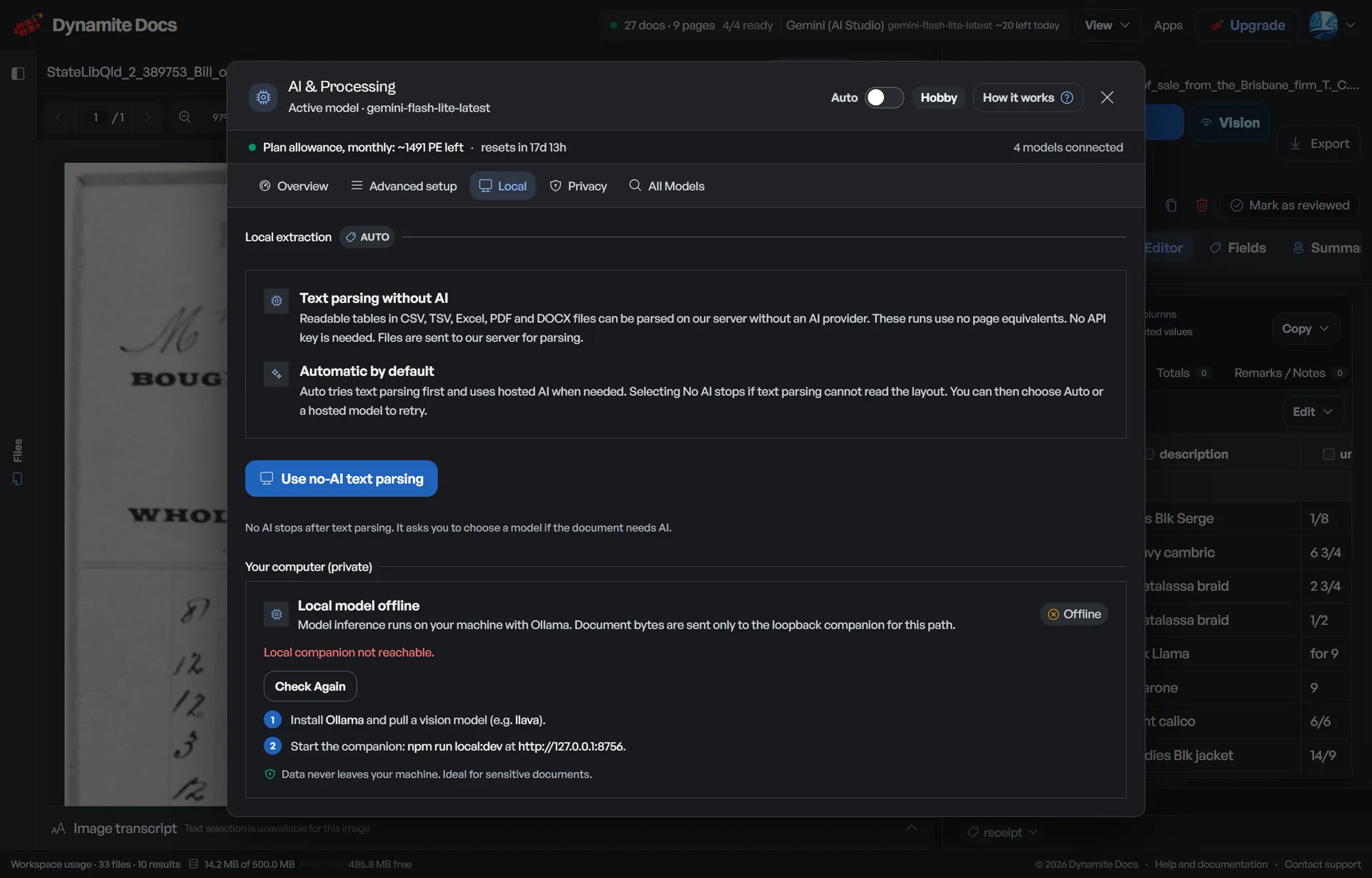
The request stays on a short local path
The companion only listens on loopback by default. Every route requires a valid token, and browser origins are restricted to the official app, configured origins and local development.
| कदम | Endpoint | परिणाम |
|---|---|---|
| 1. Token | Hosted /api/local/token | Short-lived signed local token |
| 2. Models | Companion /v1/models | Ollama models available on the machine |
| 3. Extract | Companion /v1/extract | Validated schema, rows and confidence |
| 4. Review | Browser workspace | Editable extraction and export choices |
Local does not mean effortless or identical
आत्मविश्वास
The workspace still shows confidence and [editable results](/docs/reviewing-extractions-in-data-studio). Review money, identifiers and low-quality scans as you would with any provider.
शुद्धता
Local model quality varies by model, quantization, document type and hardware. A smaller model may be faster but miss dense tables or small text.
विफलता की स्थिति
Extraction stops when Ollama is not running, the model is missing, the signed token expires, the companion cannot be reached or the model returns an invalid result.
उत्पाद सीमा
The companion has a 150 MB upload limit, a default 120-second timeout and batches scanned PDF images within the model image limit. Hardware still sets practical speed and page limits.
Local and BYOK solve different problems
Use local inference when model calls should run on the machine. Use BYOK when an external provider account should be selected and billed directly.
| Option | Model runs | Plan access |
|---|---|---|
| की मेजबानी | Dynamite Docs selected provider | Free, Starter, Pro and Scale |
| स्थानीय ओलामा | User computer through the companion | Starter, Pro and Scale |
| BYOK | External provider account chosen by user | Every plan |
The processing boundary is specific
Document bytes used for local inference move from the browser to the loopback companion and then to Ollama on the same machine. The companion does not expose an unauthenticated public extraction endpoint.
Account, plan, workspace and token issuance still use the hosted Dynamite Docs service. Teams that need a fully self-hosted application should not treat the local companion as that product.
Questions about local document ai
Which plans include local Ollama?
Starter, Pro and Scale include the local companion. Free does not. This entitlement is separate from BYOK.
Can I use Ollama for offline document extraction?
वेब वर्कस्पेस, साइन-इन और खाता सेवाओं के लिए इंटरनेट एक्सेस आवश्यक है। ओलामा मॉडल इन्फरेंस आपके पीसी पर स्थानीय रूप से चलता है। ओलामा और अपने चुने हुए मॉडल को अलग-अलग डाउनलोड करें।
How do I sign in for local extraction?
अपने ब्राउज़र में डायनामाइट डॉक्स में साइन इन करें। यदि आप किसी योग्य प्लान पर हैं, तो एआई सेटिंग्स खोलें और ओलामा मॉडल चुनने के लिए स्थानीय साथी को कनेक्ट करें।
What is the best Ollama model for document extraction?
Choose a vision model that fits your hardware and returns the required structured response. Compare candidate models on the same scans, small text and multi-page tables. Measure missing fields, row completeness and correction time rather than choosing from a single OCR example.
How do I run Ollama OCR locally on Windows?
Install Ollama and a compatible vision model, then launch the Windows companion. On Starter, Pro or Scale, sign in to the web workspace, connect the companion in AI Settings and select the local model. Import a PDF or image, run extraction and check the result beside the source.
Can Ollama convert a PDF or image to Markdown?
Ollama PDF to Markdown conversion generally requires rendering scanned pages as images for a suitable vision model. Image to Markdown conversion also depends on model output. The Dynamite Docs companion returns structured extraction data. For selectable PDF text, use the separate local PDF to Markdown converter, which runs in the browser without Ollama.
How should I prepare batch PDF extraction or batch image OCR with Ollama?
Test representative files first, including the weakest scan and longest table. Keep a consistent schema, record the expected pages and rows, and review failed or incomplete results separately. The companion processes scanned PDF pages in image batches within its request limit. That page batching is separate from stored multi-file jobs; check the processing route before assuming a job uses local inference.
Where can I find an Ollama OCR Python tutorial or API integration example?
The official Ollama vision API guide includes Python and REST examples for sending images to a vision model. A PDF workflow also needs text extraction or page rendering and output validation. Dynamite Docs connects through the Windows companion without a Python script. Its authenticated local routes are separate from the hosted REST API.
Can I use DeepSeek OCR with Ollama on Windows?
The DeepSeek OCR model page documents image OCR and Markdown prompts. Follow the Ollama Windows setup guide to run a local model. Test its response against the companion extraction contract before choosing it for Dynamite Docs. Text or Markdown output alone does not establish compatibility with the structured fields and rows expected by the companion.
Can I run document extraction locally with Ollama without exposing data to external APIs?
The model-inference request stays on the local loopback path between the browser, companion and Ollama. Account, token and workspace services remain hosted, so review the full storage and retention path before treating the workflow as self-hosted.
अगला दस्तावेज़ कार्य चुनें
- Download Windows companion: Download the signed loopback bridge connecting Ollama to the review workspace.
- Hosted, BYOK and local providers: Compare every model path in one guide.
- Private document AI controls: Place local inference inside the full storage and policy chain.
- AI provider and local setup: Configure models and provider settings in the workspace.
- Local extraction troubleshooting: Check connectivity, model availability and invalid results.
- Ollama PDF OCR and scanned document extraction: Choose text parsing or vision OCR and review multi-page results.
- Ollama image to text and JSON extraction: Prepare photos and screenshots for structured image OCR.
- Security boundaries: Review encryption, access and provider-routing controls.
- Plans with local Ollama: Compare Starter, Pro and Scale entitlements.
संबंधित वर्कफ़्लो
Set up local extraction or compare processing, storage and integration limits.
के साथ शुरू
स्रोत दस्तावेज़
इसके लिए काम करें
Your local Ollama route
- 01Install Ollama and a model
- 02Install the Windows companion
- 03Connect from AI Settings
- 04Extract and review locally
स्थानीय ओलामाके साथ शुरू
स्रोत दस्तावेज़
इसके लिए काम करें
Your local Ollama route
उदाहरण स्रोत
स्रोत दस्तावेज़
- Document type
- invoice, statement, form or report
- Suggested schema
- Named columns inferred from the file
- पंक्तियों
- Structured records for review
Model inference on your own computer.
स्थानीय ओलामा