Bank statement extraction to Excel and CSV
Stop typing invoices into spreadsheets.
Bank statements arrive in different layouts and often as scans that cannot be copied into a spreadsheet. Dynamite Docs turns the transactions into dated rows with descriptions, debits, credits and running balances. Review unclear values against the statement, reconcile the totals and export the checked table to Excel or CSV.
Try a bank statement or compare its storage, processing, and export limits.
See the workflow
Upload your statement → Dynamite Docs builds the transaction table → Review flagged numbers.
Bank statements are formatted for reading, not accounting
- Every financial institution lays out transaction dates, descriptions, check numbers, and balances differently.
- Scanned paper statements have no selectable text, preventing standard copy and paste.
- Retyping long lists of transactions often leads to small errors, like transposed digits or skipped lines, that cause balance mismatches.
- Accountants and bookkeepers managing multiple clients have to navigate several different bank layouts every week.
Document types this workflow handles
- Digital bank statement PDFs: e-statements downloaded from online banking
- Scanned paper statements: paper records read with optical character recognition
- Multi-page statements: statements spanning multiple pages
- International statements: formats from US, UK, European, Australian, and Indian banks
What gets extracted from a bank statement
Fields are identified from each statement structure. A typical extraction provides:
- Transaction date: 2026-07-28
- Description: ACH DEP PINNACLE MARKETING
- Type: Debit
- Amount: $248.90
- Running balance: $12,406.51
- Reference: A-9901247
- Opening / closing balance: $14,180.20 / $13,410.35
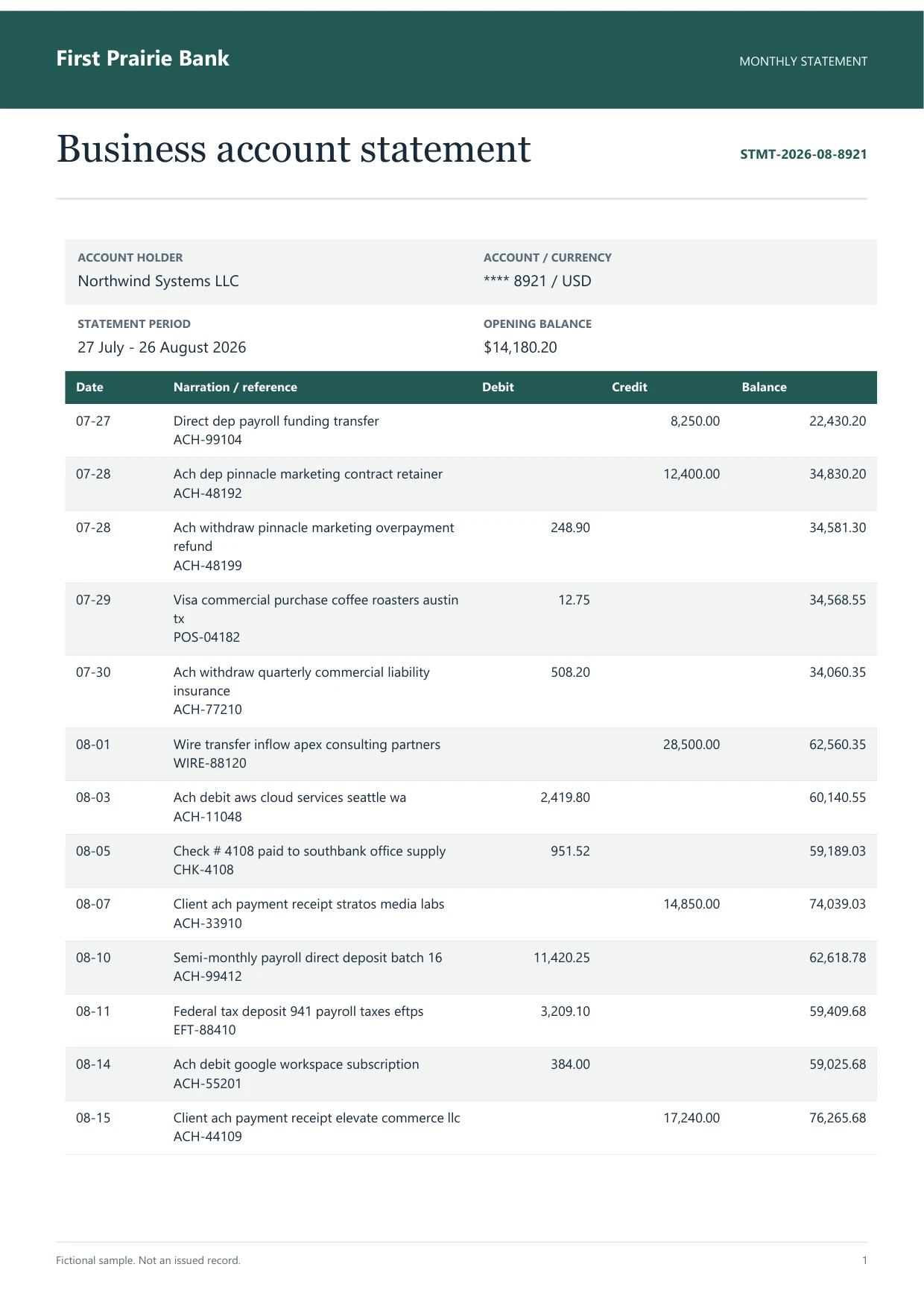 A business checking statement, 27 July to 31 August 2026.
A realistic example
Sample data. Not a real invoice or filing record.
A bank statement extracts into organized rows like these, ready to reconcile against your books:
| Date | Description | Type | Amount | Balance |
|---|
| 2026-07-27 | DIRECT DEP PAYROLL | Credit | +$8,250.00 | $14,180.20 |
| 2026-07-28 | ACH DEP PINNACLE MARKETING | Debit | -$248.90 | $13,931.30 |
| 2026-07-29 | VISA PURCHASE COFFEE ROASTERS | Debit | -$12.75 | $13,918.55 |
| 2026-07-30 | ACH WITHDRAW QUARTERLY INSURANCE | Debit | -$508.20 | $13,410.35 |
What to validate before export
Validation issue
Opening balance plus net activity must reconcile to the closing balance.
Limitation
The output does not reconcile accounts or assign ledger codes automatically.
Reviewed by Dynamite Docs content team. Last verified 2026-08-28.
Why accurate statement data speeds up month-end close
Reconciling an account requires matching every transaction against your accounting records. When statement lines are retyped by hand, small mistakes like flipped numbers or missed bank charges can hide in plain sight, causing confusing balance differences at the end of the month.
Extracting statement data directly into a spreadsheet creates a clean baseline for comparison. You can quickly filter by date or amount, spot unrecorded bank fees, and confirm that opening and closing balances tie out correctly.
For bookkeepers handling multiple client accounts, automated extraction saves hours of manual transcription each week. Once you verify a bank format, future statements from that institution are processed even faster.
Security and accuracy for financial statements
Bank statements contain sensitive financial information. Dynamite Docs supports strict data residency policies and never uses your documents to train public AI models. You can also run processing locally on your machine using our Ollama companion on Hobby, Pro, and Ultra.
Digital PDF statements are read directly from their text layer for free without calling external AI models. Scanned statements use visual character recognition with your choice of provider.
The extracted transaction records remain completely under your control, ready to export to any spreadsheet or accounting tool.
Questions, answered
Can Dynamite Docs read statements from international banks?
Yes. The system recognizes common statement structures worldwide, including varying date formats, currencies, and column arrangements from US, UK, European, Australian, and Indian banks.
How does it handle scanned paper statements?
Scans and photo copies are processed using optical character recognition (OCR) to read the printed text. Any faint or unclear figures are flagged for quick verification.
How do I transfer the data into my accounting software?
You can download your transactions as CSV, Excel, JSON, Word, or Google Sheets files, which can be imported directly into QuickBooks, Xero, Sage, or other reconciliation tools.
How does this differ from credit card statement processing?
Bank statements track operating checking and savings accounts with deposits and withdrawals. Credit card statements focus on merchant purchases, cardholder names, and interest charges. Both workflows are supported.
Related document workflows
Related extraction articles
Open the document extraction workspace, no card needed.