AI providers: BYOK, hosted & local
AI: /api/ai/*, /api/local/*
Content reviewed .
Connect a supported provider key when you want the model account and provider billing under your control. Dynamite Docs sends the extraction request to the model you select, keeps the source and proposed result in the review workspace, and exports the data you accept. The provider bills its own usage. Free and Starter own-key pages use monthly PE; Pro and Scale own-key runs cost 0 PE.
Open this integration in the app or read the public API and webhook guide.
What changes when you bring the provider account
- The provider account, model availability, API limits, and provider charges remain under your control.
- Scans and photos need a vision-capable model. A text-only model cannot inspect the pixels on an image-only page.
- Provider retention, training, and regional terms differ. Check the selected route before sending a sensitive document.
- A model can return an incomplete or incorrect value. The source-first review and export steps stay the same whichever route you select.
How BYOK document extraction works inside Dynamite Docs
01. Connect your API key in settings
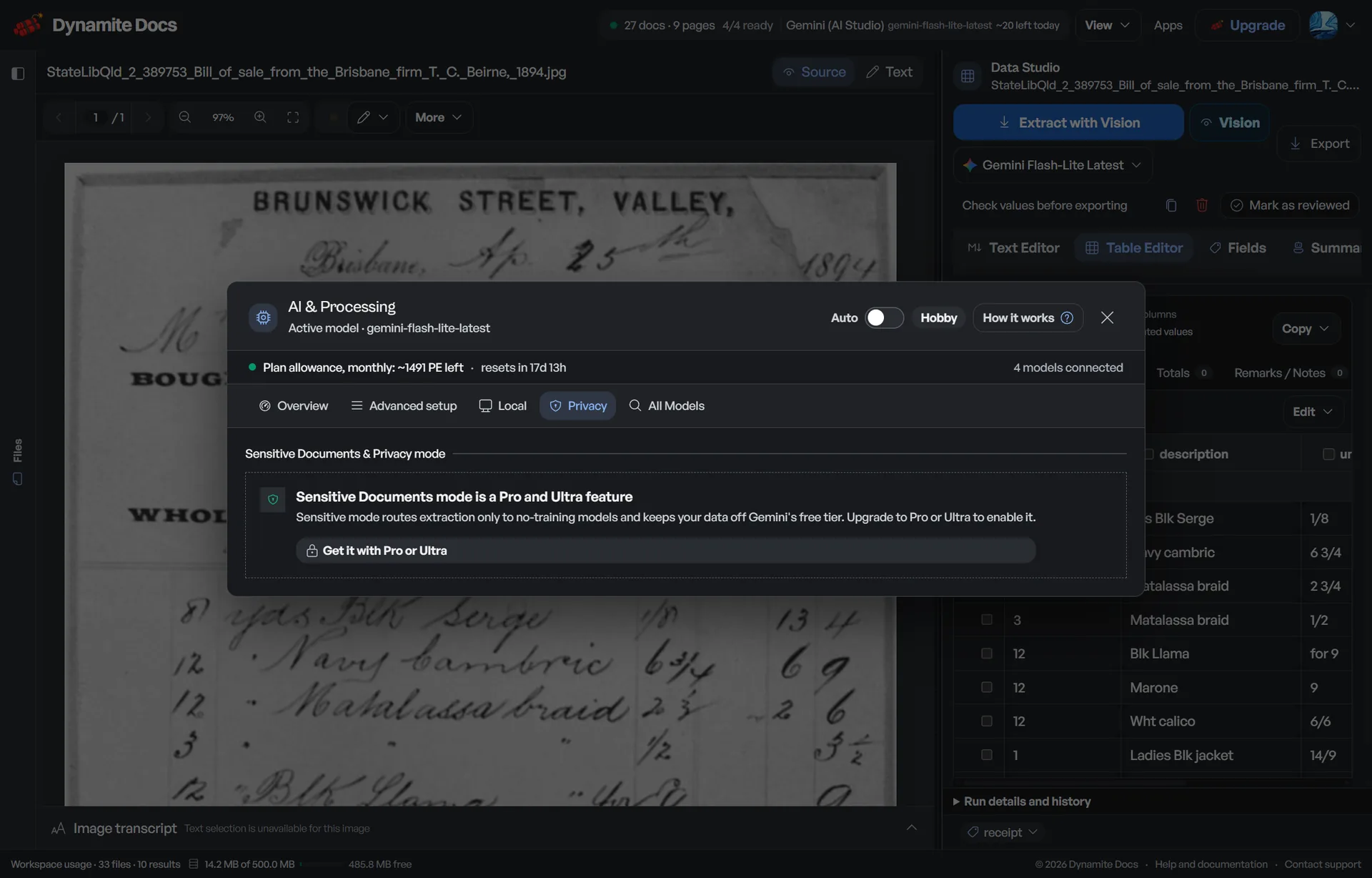
Open Settings > AI & Processing in your workspace. Choose your provider from Google Gemini, Groq, Mistral, OpenAI, Anthropic, OpenRouter, or Custom Endpoint. Paste your secret key and click Verify & Save Key. The server runs an instant health check to discover available models and encrypts the key at rest using AES-256-GCM.
02. Configure active models and fallback routing
Choose from the models discovered for the verified key. If you configure a fallback, make sure it also supports the document type and satisfies the same privacy policy. A fallback reduces dependency on one route but does not guarantee availability.
03. Set data privacy and residency policies
Use the policy controls to exclude routes that do not meet the active training or residency rule. When cloud transmission is not acceptable, use the signed local Ollama companion on an eligible plan.
04. Extract, review, and export
Upload a supported document and run it with the selected route. Compare proposed fields and rows with the source before export. Free and Starter own-key pages use the monthly PE allowance; Pro and Scale own-key runs cost 0 PE. Provider charges and limits still apply.
Supported providers, endpoints, and architectural controls
The available model list is discovered from each verified account. Provider keys are encrypted with AES-256-GCM before storage:
- Google Gemini: Use models returned by the connected Google account and check vision support.
- Groq Cloud: Use models returned by the connected Groq account and its current limits.
- Mistral AI: Use models returned by the connected Mistral account and its regional terms.
- OpenAI & Anthropic: Choose a vision-capable model for scans and images; check current API terms.
- Cloud Platforms: Azure OpenAI, Amazon Bedrock, Google Vertex AI, and OpenRouter gateways
- OpenAI-Compatible Endpoints: LiteLLM, vLLM, Ollama server, or internal private VPC endpoints
- Local Ollama Companion: Signed loopback connection on port 8756 for model inference on your computer.
- PE treatment: Free and Starter own-key pages use PE; Pro and Scale own-key runs cost 0 PE.
A realistic example
Possible routes for a mixed batch of accounting documents:
| Document type | Configured route | Reason to choose it |
|---|---|---|
| Clean digital supplier invoice (PDF) | Hosted or own-key model | The file has selectable text, but fields and line-item structure still need review. |
| Crumpled store receipt photo (JPG) | Vision-capable hosted or own-key model | The model must inspect pixels, layout, and small receipt text. |
| 60-page historical bank statement (Scan) | Vision-capable provider with suitable limits | Check the provider context and request limits, then review page joins and running balances. |
| Confidential executive agreement (PDF) | Local Ollama companion | Model inference runs through the signed loopback connection instead of an external model API. |
Request and response examples
Verify and store an encrypted provider key
POST /api/ai/keys
curl -X POST \
  -H "Authorization: Bearer <clerk_token>" \
  -H "Content-Type: application/json" \
  -d '{
    "provider": "groq",
    "apiKey": "gsk_a8b9c0d1e2f3...",
    "preferredModel": "<discovered_model_id>"
  }' \
  "https://app.dynamitedocs.com/api/ai/keys"
{
"success": true,
"provider": "groq",
"status": "connected",
"discoveredModels": [
"<discovered_model_id>",
"<another_available_model_id>"
],
"activeModel": "<discovered_model_id>",
"verifiedAt": "2026-09-15T15:00:00.000Z"
}Run document extraction using connected BYOK provider
POST /api/v1/infer
curl -X POST \
  -H "Authorization: Bearer dd_live_9f8e7d6c5b4a..." \
  -F "file=@invoice_2026_09.pdf" \
  -F "docType=Invoice" \
  -F "provider=groq" \
  -F "model=<discovered_model_id>" \
  "https://app.dynamitedocs.com/api/v1/infer"
{
"id": "ext_9821af4e",
"docType": "Invoice",
"peCharged": 0,
"executionTimeMs": 740,
"provider": "groq",
"model": "<discovered_model_id>",
"columns": ["Item", "Qty", "Unit Price", "Total"],
"rows": [
["Server Hosting Q3", "1", "120.00", "120.00"],
["Bandwidth Allocation", "5", "15.00", "75.00"]
],
"metadata": {
"invoiceNumber": "INV-2026-882",
"subtotal": "195.00",
"tax": "17.55",
"total": "212.55"
}
}What to validate before relying on it
Verify that the selected provider supports your document type (multimodal vision vs text) and satisfies active data residency, zero-training, or local loopback policies before processing sensitive files.
Provider billing, key storage, and local processing
With an own-key route, the model provider bills its own API usage and enforces its own rate, model, and account limits. Dynamite Docs plan rules still apply: Free and Starter own-key pages use monthly PE, while Pro and Scale own-key runs cost 0 PE.
Provider API keys are encrypted with AES-256-GCM before storage. The server decrypts a key only when it needs to authenticate a request to that provider. The browser never receives the stored secret after setup.
Retention, training, and regional handling depend on the selected provider and account terms. Use the policy controls to block routes that do not meet the active rule, and verify the provider documentation for the account you connect.
The local Ollama companion is a separate loopback-only service on port 8756. Every companion route requires a signed local token. Use it on an eligible plan when model inference should run on your computer instead of an external provider API.
What provider routing does and does not do
Does
- Sends an authenticated extraction request to the hosted, own-key, custom, or local route you select.
- Encrypts stored provider keys with AES-256-GCM.
- Discovers the models currently available to a verified provider account.
- Applies configured provider-policy and fallback rules before an eligible request is routed.
- Supports model inference through the signed local Ollama companion on an eligible plan.
Does not
- Does not control a provider's prices, model availability, rate limits, or account terms.
- Does not make a text-only model capable of reading an image-only document.
- Does not guarantee that a fallback route is available or policy-compatible.
- Does not make a model response correct without source review.
- Does not bypass Free or Starter PE limits when you use your own key.
Keep the review contract stable when the model changes
Provider models and account limits change. The useful constant is the workflow around them: a supported source file, proposed fields and rows, source review, corrections, and an explicit export.
Changing the model does not prove that its output matches the last model. Keep required columns and validation checks in the workspace, then compare high-risk values with the source before delivery.
Choose a hosted, own-key, custom, or local route according to the document type, provider terms, and the controls your organization requires.
Questions, answered
How do I generate an API key for document extraction?
Sign in to your provider developer console: Google AI Studio (aistudio.google.com/app/apikey), Groq Cloud (console.groq.com/keys), Mistral AI (console.mistral.ai/api-keys), OpenAI Platform (platform.openai.com/api-keys), or Anthropic (console.anthropic.com/settings/keys). Create a new secret key, copy the token, navigate to Settings > AI & Processing in Dynamite Docs, and click Verify & Save Key.
Does Dynamite Docs charge PE when I use my own API key?
Free and Starter own-key pages draw from the monthly PE allowance. Pro and Scale own-key runs cost 0 PE, though provider charges, file-size limits, and provider limits still apply.
Do AI providers train their foundation models on my invoices?
Provider handling depends on the provider, product, account, and current terms you use. Check those terms before processing a sensitive invoice. Dynamite Docs can block routes that do not meet an active no-training policy, and eligible plans can use the local Ollama companion instead of an external model API.
How is own-key processing billed?
The provider bills its own API usage at the rates attached to your account. Dynamite Docs applies the PE treatment of your plan. Check both the provider dashboard and the Dynamite Docs usage ledger when estimating a batch.
What happens when a provider hits an HTTP 429 rate limit?
The route can expose quota signals and use an eligible configured fallback. A fallback must support the document and satisfy the active provider policy. If no eligible route is available, the extraction can fail and should be retried after the provider limit clears.
Can I extract data completely offline without cloud transmission?
On Starter, Pro, and Scale, the local Ollama companion can run model inference on your workstation through an authenticated loopback connection on port 8756. Use browser-only file storage with that route when the document must not be sent to an external model provider.
Do column names change when switching between different AI models?
They can if the requested schema or reviewed pattern does not constrain them. Compare the result after a model change, keep required columns explicit, and validate the final JSON or spreadsheet before a downstream import.
Can BYOK vision models extract handwritten receipts and blurry smartphone photos?
A vision-capable model can attempt those files, but blur, glare, skew, fading, and handwriting increase error risk. Use the original image when possible and compare merchant, date, tax, total, and line items with the source.
Related integration articles
Open the integrations workspace, no payment details.