AI accounts receivable automation for remittances and payments
AI accounts receivable automation reads remittance advices, payment confirmations and customer statements, and turns them into rows that show which invoices a payment covers. Dynamite Docs extracts payer, payment reference, invoice numbers, amounts applied, discounts and balances for review, so your team can apply cash with the evidence beside it.
By Dynamite Docs. Published . Updated .
Export directly to your accounting software



Sample remittance advice
Source document(drag to dropzone)Page 1
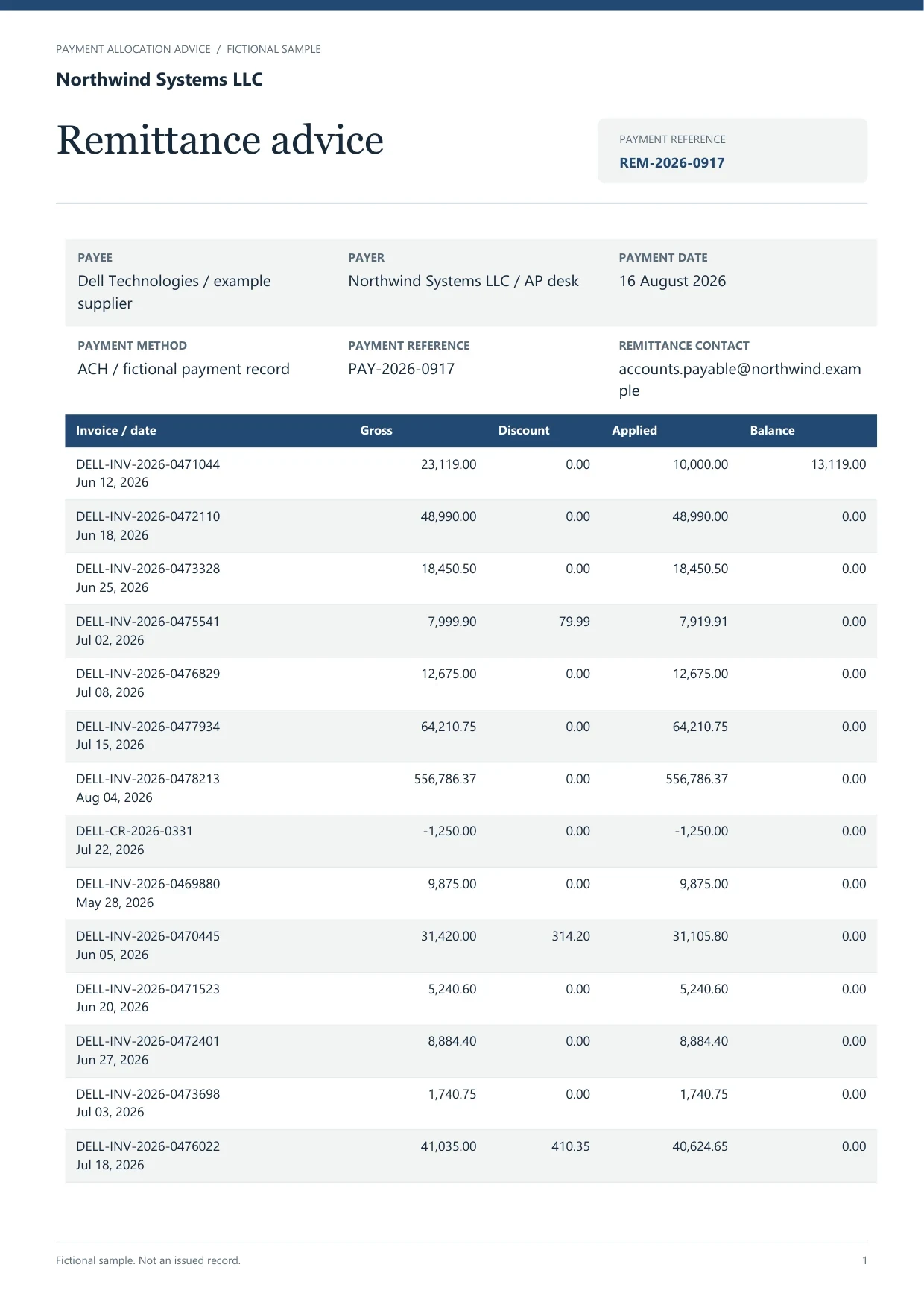
Sample extracted data3 fields
- Advice number
- REM-2026-0917
- Payment date
- 16 August 2026
- Payment reference
- PAY-2026-0917
Answer in 30 seconds
Use Dynamite Docs for AI accounts receivable automation: extract remittance advices and payment details, then review invoice matches before cash application.
How AI accounts receivable automation works

Collect payment evidence
Upload remittance advices, payment confirmations and the bank statement for the same period. Pro and Scale can forward emails with supported attachments to a private intake address.

Extract payment and invoice lines
The extractor proposes payer, payment date, method, payment reference and a table of invoice numbers with gross, discount, applied and balance amounts.

Match and review
Compare the applied amounts with open invoices in your receivables ledger. Check that the applied total equals the payment received and record the reason for any difference.
Apply cash in your system
Export the reviewed remittance rows to Excel, CSV or JSON and use them to apply the payment in your accounting system.
Receivables documents this workflow reads
 Remittance advicesPayment confirmationsCustomer statements of account
 Bank statement credits
Remittance fields captured for cash application
 Dynamite Docs
- Payer
- Northwind Systems LLC
- Remittance reference
- REM-2026-0917
- Payment reference
- PAY-2026-0917
Request the fields your receivables team needs to apply a payment:
Where receivables extraction fits with other workflows
Sales invoice copies can be processed with AI invoice processing to build the register that remittances are matched against. Bank statements supply the credits that confirm each payment arrived.
Starter and above store files and run batch jobs, which suits month-end remittance volumes. Every signed-in plan can download reviewed rows as Excel, CSV or JSON.
Questions, answered
It extracts the invoice numbers and amounts a customer lists. Matching them to open receivables happens in your accounting system or spreadsheet, with a reviewer resolving near-matches.
Keep the number as printed and add a separate matched-invoice column. Do not overwrite the source value.
Upload remittances as PDFs, scans or photos. Pro and Scale can also forward emails with supported attachments to a private intake address.
Yes. Extract the invoice list, payments and closing balance, then compare them with your own ledger for that customer.
Extraction guides

Related document workflows

From the blog
How to convert bank statements to Excel for AI bookkeeping
Learn how to convert bank statements to Excel with AI using Dynamite Docs for bookkeeping. Check dates, transaction signs, and balances before reconciliation.
How to extract PDF tables using AI without losing row structure
Learn how to extract PDF tables with AI using Dynamite Docs. Preserve row structure, review OCR errors and columns, then export checked spreadsheet data.
How to validate totals and line items after AI invoice extraction
Learn how to validate AI-extracted invoices in Dynamite Docs. Recalculate quantities, prices, tax, and freight before exporting checked line items and totals.

Apply one remittance with evidence
Upload a remittance advice and the bank statement for the same week. Check that the applied amounts add up to the credit, then export the rows for cash application.