


Parse
PDF to rows
Extract dated transactions with debit, credit and balance columns.
Teams searching for bank statement to Tally XML often want automatic payment vouchers. Dynamite Docs first converts statement PDFs into dated transaction rows with narrations, debits, credits and balances for review in Excel. You map those rows in TallyPrime import templates. Dynamite Docs does not create contra or payment vouchers.
By Dynamite Docs. Published . Updated .
Review and export GST data
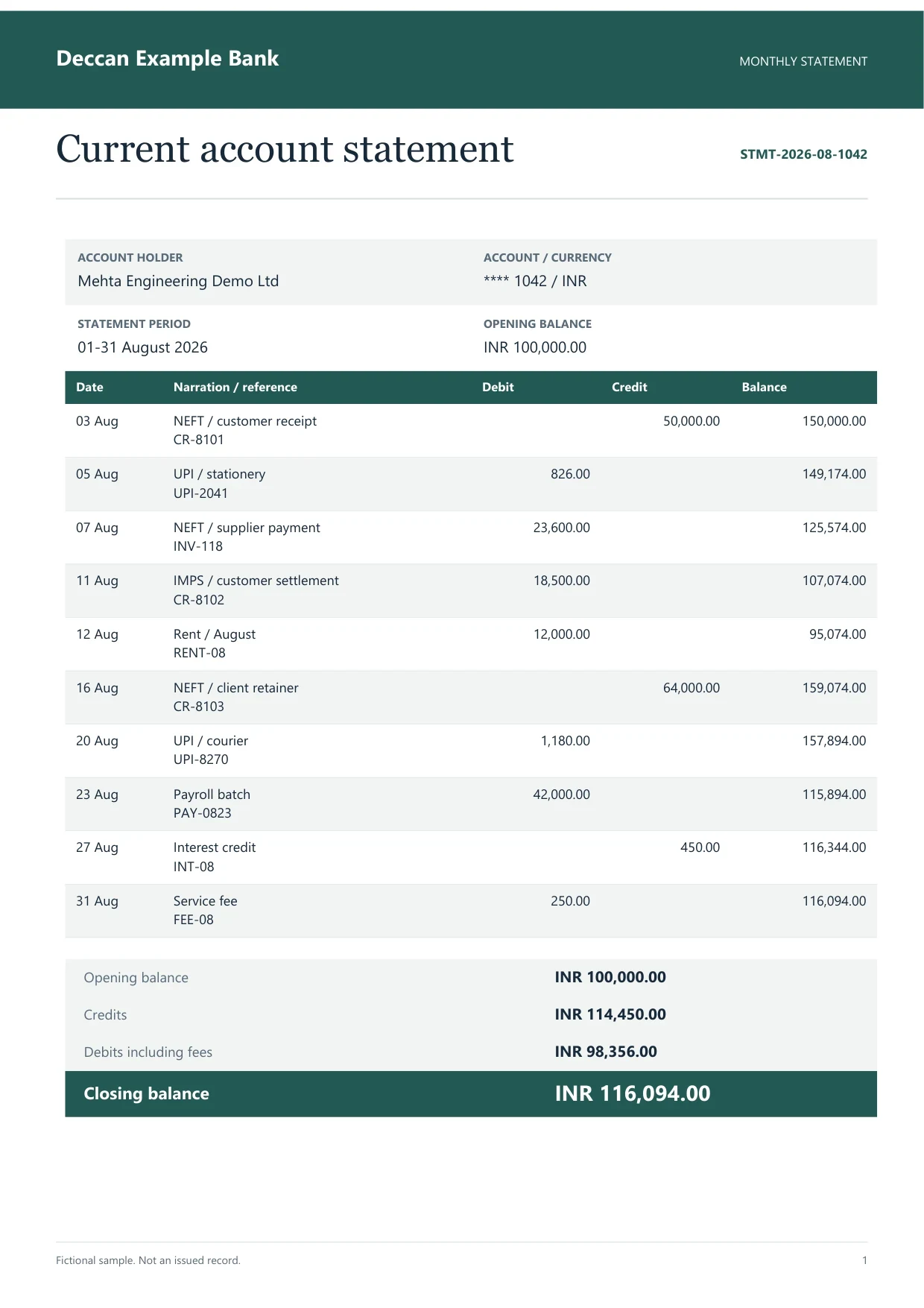
Sample indian bank statement
Source document(drag to dropzone)Page 1
Sample extracted data3 fields
Answer in 30 seconds

Add SBI, HDFC, ICICI, Axis or other Indian bank exports. Multi-page files stay in one extraction.

Dates, narrations, reference numbers, debits, credits and running balances export as structured columns.

Confirm opening plus net movement equals closing balance. Flag missing pages before mapping.
Use Tally Excel import with your ledger rules. Dynamite Docs does not post bank vouchers automatically.
 Savings account PDFsCurrent account statementsScanned passbook pages
 Multi-account exports
Reconcile in Dynamite Docs before you open Tally import.
Parse
Extract dated transactions with debit, credit and balance columns.
Review

Confirm opening, running and closing balances on long PDFs.
Export

Download CSV or Excel for your TallyPrime import template.
 Dynamite Docs
Typical row shape after review:
Starter allows 50 pages per document, 25 files per job and 100 monthly page equivalents. Pro allows 500 pages per document, 200 files per job and 1,000 page equivalents. Scale allows 1,000 pages per document, 500 files per job and 5,000 page equivalents.
Long statements consume one page equivalent per successfully processed page. Reconcile before you invest time in Tally mapping.
Starter allows 25 files per job, 10 active jobs, 100 monthly page equivalents (PE), and 50 pages per document. Pro allows 200 files per job, 25 active jobs, 1,000 PE, and 500 pages per document. Scale allows 500 files per job, 50 active jobs, 5,000 PE, and 1,000 pages per document. Failed pages cost 0 PE.
Paid invoice intake · PRO and Scale
Forward invoice attachments to your private Dynamite Docs address. They are stored in your account, extracted automatically, and placed in the dashboard for review and export.
It exports reviewed transaction rows to Excel, CSV or JSON. You map them with Tally import tools.
No. The product does not create payment, contra or receipt vouchers.
Layout-based parsing for major Indian banks; test your exact PDF because formats change.
You may keep a reviewer column. Automated ledger assignment is not a product guarantee.
Unlock or export an unprotected copy from net banking before upload.

Learn how to convert bank statements to Excel with AI using Dynamite Docs for bookkeeping. Check dates, transaction signs, and balances before reconciliation.
Learn how to extract PDF tables with AI using Dynamite Docs. Preserve row structure, review OCR errors and columns, then export checked spreadsheet data.

Upload a full PDF, reconcile balances, export rows, and test a small Tally import in a test company.
Can we save optional cookies?
Essential cookies keep you signed in. Optional analytics and masked session replays help diagnose errors. Change your choice in Cookie settings. Privacy policy.