AI audit assistance for Indian CAs preparing vouching and GST checks
AI audit assistance for Indian CAs means using extraction to build vouching and GST check schedules from client documents, so the engagement team spends its time on testing rather than typing. Dynamite Docs reads purchase bills, sales invoices and bank statements into rows with GSTIN, invoice number, taxable value, tax split and narration for comparison with the books.
By Dynamite Docs. Published . Updated .
Review and export GST data



Sample GST tax invoice
Source document(drag to dropzone)Page 1
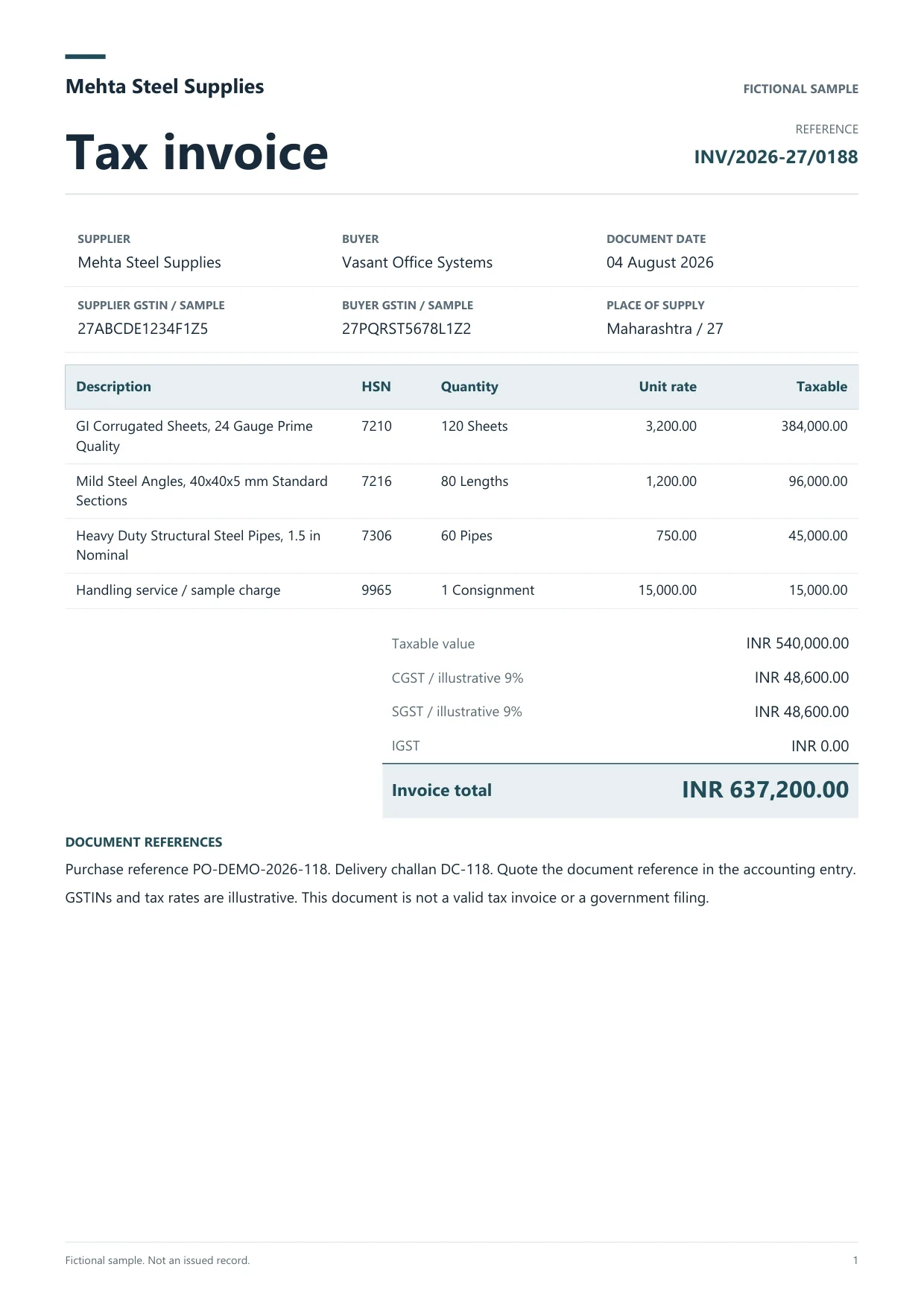
Sample extracted data4 fields
- Invoice number
- INV/2026-27/0188
- Supplier
- Mehta Steel Supplies
- Supplier GSTIN
- 27ABCDE1234F1Z5
- Invoice total
- INR 637,200.00
Answer in 30 seconds
Use Dynamite Docs for AI audit assistance: extract purchase bills, sales invoices and bank statements into vouching schedules that Indian CAs review.
How AI audit assistance fits an audit file

Index the client documents
Upload the sampled bills, sales invoices and bank statements for the period into one folder per client and assignment.

Extract vouching fields
Review supplier or customer GSTIN, invoice number, date, HSN or SAC, taxable value and CGST, SGST or IGST beside each document.
Compare with the books and returns
Export the rows and match them to the client’s purchase or sales register and to GSTR-2B or GSTR-1 data, using GSTIN and invoice number as keys.
Record exceptions for the team
Mark differences such as a tax amount mismatch, an invoice missing from GSTR-2B or a duplicate entry, and keep the source reference so a reviewer can check it.
Client documents this workflow reads
 Purchase bills
 Sales invoices and e-invoices
 Indian bank statementsRegister printouts
Vouching fields extracted for each sampled document
 Dynamite Docs
- Client and period
- Brightline Fabricators, FY 2026-27
- Document type
- Purchase invoice
- Supplier GSTIN
- 27AABCT1429P1ZM
Each sampled document becomes one row with these columns:
Confidentiality and plan choices for audit work
Client documents are confidential. Check the privacy policy, use a separate folder per client and assignment, and on Starter and above consider running inference locally through the Windows companion. Account, plan and token state stay hosted even in local mode.
Free covers small samples of up to 5 documents a day. Starter adds stored files and batch jobs of 25 files, and Pro raises the allowance to 1,000 page equivalents a month with 200 files per job for larger engagements.
Questions, answered
No. It prepares schedules from documents. Sampling, testing, evaluation of exceptions and the audit opinion stay with the CA and the engagement team.
Yes. Extract purchase bills, export the rows and match them to GSTR-2B and the purchase register on GSTIN and invoice number. The reviewer decides how to treat each difference.
It reads statement PDFs and scans by layout rather than by a fixed bank template. Check each page for wrapped narrations and confirm that the closing balance ties out.
Use one folder per client and assignment, and export a separate schedule for each. Do not mix clients in one batch job.
Extraction guides

Related document workflows

From the blog

AI extraction for audit working papers
Learn how auditors prepare working papers with AI extraction using Dynamite Docs. Review invoice and statement rows against source evidence before testing.

Match GSTR-2B records against AI-extracted purchase invoice data
Learn GSTR-2B matching with AI-extracted Indian invoices using Dynamite Docs. Review GSTINs, dates, values, tax, and missing or partial matches.

Build a vouching schedule from five bills
Upload five sampled purchase bills, review the GSTIN, invoice number and tax split, and match the export to the purchase register and GSTR-2B.