Manual entry

A person types each field
Works for any layout and needs no setup, but every value is keyed by hand, and errors surface only when totals fail to tie.
AI document processing software takes a mixed set of business documents, such as invoices, receipts, bank statements and purchase orders, and turns each one into labelled, structured data. Dynamite Docs records a document type for every file, proposes fields and table rows without a supplier template, flags values that need a second look, and holds the result for a person to review before it is exported.
By Dynamite Docs. Published . Updated .
Export directly to your accounting software
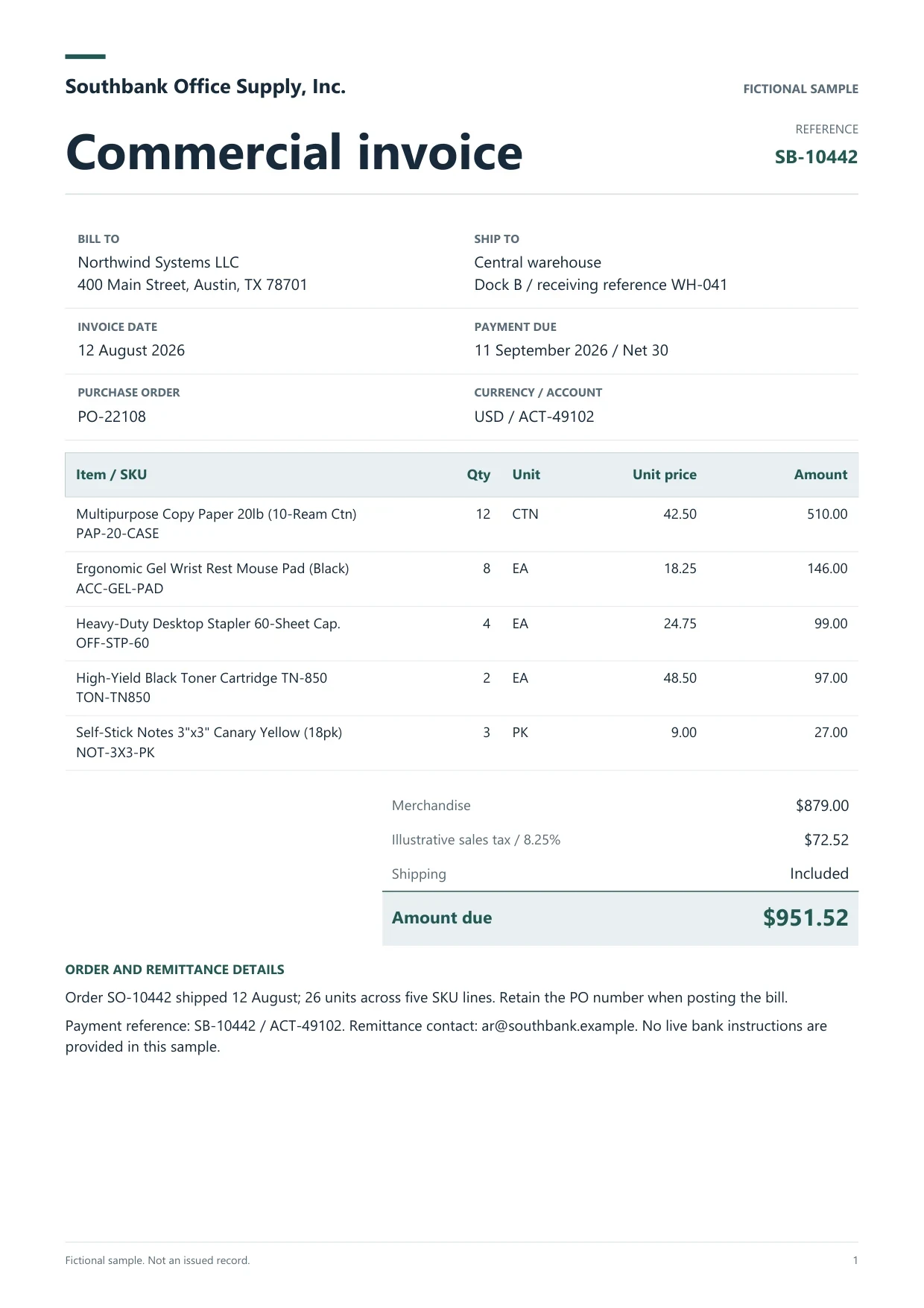
Sample commercial invoice
Source document(drag to dropzone)Page 1
Sample extracted data3 fields
Answer in 30 seconds

Add PDFs, scans and photos. Word, Excel, CSV, HTML and email files are read as text. Free files stay in browser storage; Starter and above can keep originals in the cloud library.
The model reads each file, records a document type such as Invoice or Bank statement, and proposes header fields and table rows. No template or zone setup is needed for a new layout.
Open the result next to the source. Check any warning, such as a missing subtotal, tax or total, a duplicated line, or a saved pattern that only partly matches the new file.
Download CSV, JSON or Excel on any plan. Starter and above add Google Sheets push, REST API tokens and signed webhooks for the next system.
 Supplier and sales invoices
 Receipts
 Bank and card statements
 Purchase orders and other forms
These are the three common ways finance teams turn documents into data. The comparison describes the methods, not any named vendor.
Manual entry
Works for any layout and needs no setup, but every value is keyed by hand, and errors surface only when totals fail to tie.
Template or zone parser

Reliable for a layout that never changes. Each new supplier or redesigned form needs a new template before its documents can be read.
AI document processing
Reads new layouts without a template and records a document type. A reviewer still checks flagged values, and confirmed corrections can be saved as a pattern for similar files.
See how inference and patterns work Dynamite Docs
Every processed file produces a record with these parts:

Free includes 25 page-equivalents (PE) a month, 5 documents a day and up to 5 pages per document. Starter allows 50 pages per document, Pro 500 and Scale 1,000. Each successfully processed page uses 1 PE; failed pages use none. See pricing for the current allowances.
Choose hosted models, connect your own provider key on any signed-in plan, or on Starter and above send model inference to Ollama on your own computer through the Windows companion. Your account and workspace stay hosted in every mode. See private extraction routes before processing sensitive files.
OCR turns an image of text into characters. AI document processing goes further: it labels the document, decides which values are fields or table rows, and checks the result. Dynamite Docs uses OCR for scans and photos as one part of that process. Read the glossary note what is OCR for the definition alone.
Yes, the terms describe the same idea: identify the document, extract structured data and validate it. Dynamite Docs focuses on finance documents and keeps a person reviewing the output before export.
Each result is labelled with a document type that the model identifies, and you can change it or set a custom type. It does not split combined PDFs or route documents to different approval paths.
No. Fields are inferred from each document. If you correct a result, you can save the confirmed version as a pattern to guide later files with the same layout.
Yes, on Starter and above. Store the files in your library, add them to a named job and run it. Starter allows 25 files per job, Pro 200 and Scale 500.
Learn template-free invoice extraction with AI using Dynamite Docs. Review supplier fields, line items, tax, and totals across changing document layouts.
Learn how to extract scanned PDF data with AI using Dynamite Docs. Prepare the scan, review fields and tables, then export rows checked against the source.
Learn how to validate AI-extracted invoices in Dynamite Docs. Recalculate quantities, prices, tax, and freight before exporting checked line items and totals.

Upload an invoice, a receipt and a statement, check the document type and warnings on each, and export the reviewed rows.
Can we save optional cookies?
Essential cookies keep you signed in. Optional analytics and masked session replays help diagnose errors. Change your choice in Cookie settings. Privacy policy.