Bank
PDF to rows
Parse statements within plan page and job limits.
Searches for tally contra and payment voucher automation assume software will create bank vouchers from statements. Dynamite Docs extracts statement rows and invoice purchase data for review. Contra, payment and receipt vouchers remain manual in TallyPrime under your policies.
By Dynamite Docs. Published . Updated .
Review and export GST data
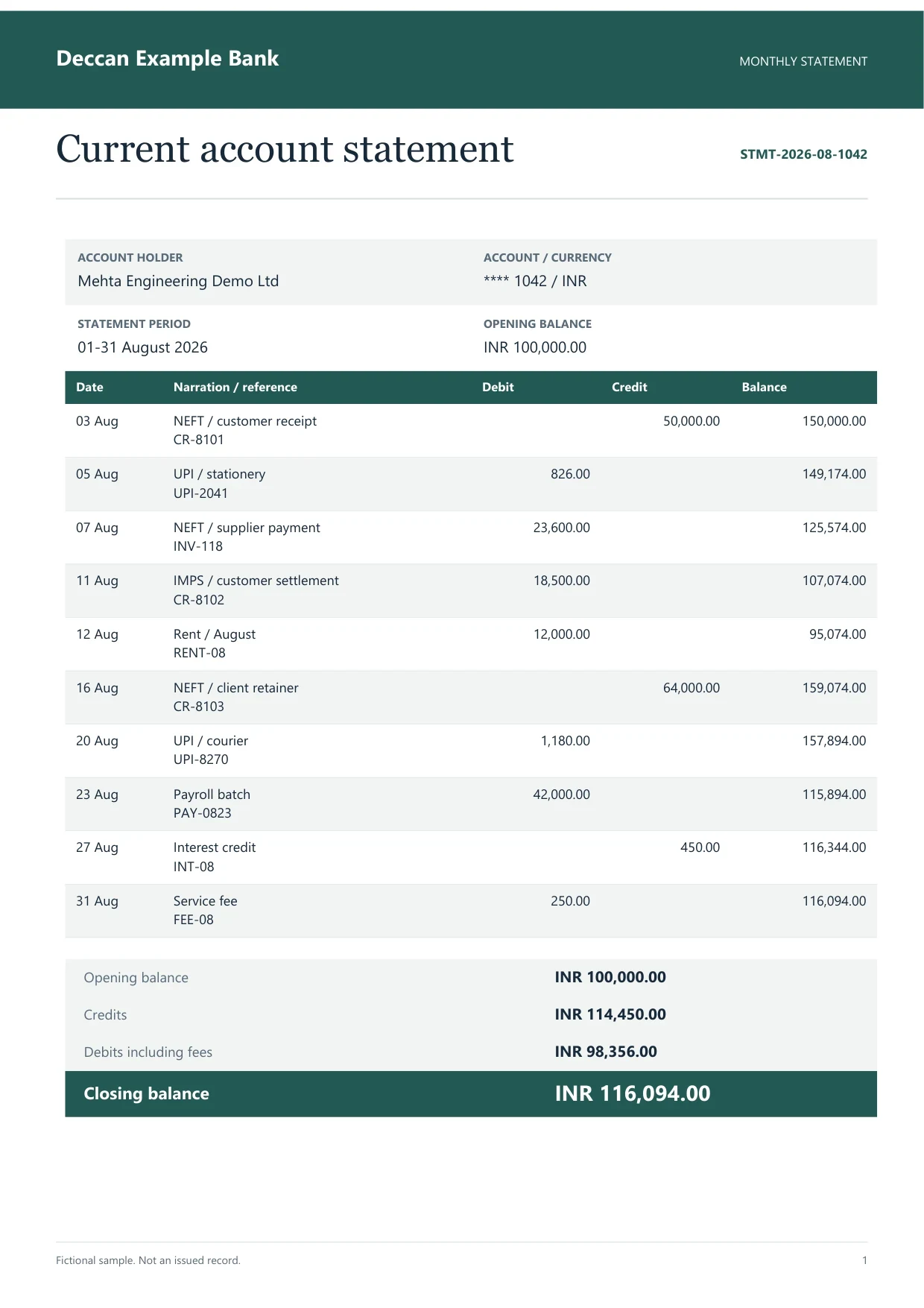
Sample indian bank statement
Source document(drag to dropzone)Page 1
Sample extracted data3 fields
Answer in 30 seconds

Prove opening and closing balances before any voucher discussion.

Create payment, receipt and contra vouchers manually or with your existing Tally rules.
 Bank PDFs
 Supplier bills
 Payment receiptsInter-account transfers
Use Dynamite Docs for evidence rows, Tally for voucher types.
Bank
Parse statements within plan page and job limits.
Purchase

Companion posts reviewed purchase bills only.
Treasury
Payment, receipt and contra stay in TallyPrime.
 Dynamite Docs
Typical bank row columns without voucher type assignment:
All plans extract and export bank rows within page and storage limits. Starter allows 25 files per job; Pro 200; Scale 500.
No plan creates contra, payment or receipt vouchers in Tally. Purchase voucher posting stays limited to reviewed purchase bills with the companion.
Starter allows 25 files per job, 10 active jobs, 100 monthly page equivalents (PE), and 50 pages per document. Pro allows 200 files per job, 25 active jobs, 1,000 PE, and 500 pages per document. Scale allows 500 files per job, 50 active jobs, 5,000 PE, and 1,000 pages per document. Failed pages cost 0 PE.
Paid invoice intake · PRO and Scale
Forward invoice attachments to your private Dynamite Docs address. They are stored in your account, extracted automatically, and placed in the dashboard for review and export.
This page states today’s scope. Bank vouchers stay manual in TallyPrime after row review.
Not from Dynamite Docs exports. Use Tally import rules your administrator maintains.
No. The companion posts reviewed purchase vouchers when configured.
Dynamite Docs speeds PDF-to-row conversion and invoice voucher prep, not treasury voucher automation.
No. Export rows with a reviewer column and apply your Tally rules manually.

Parse one statement, list which narrations become payment versus contra in Tally, and keep Dynamite Docs rows as evidence only.
Can we save optional cookies?
Essential cookies keep you signed in. Optional analytics and masked session replays help diagnose errors. Change your choice in Cookie settings. Privacy policy.