


Manual

Save from chat
Staff save PDF or image to device storage, then upload with intake method WhatsApp saved in notes.
Teams searching for a WhatsApp invoice intake bot want messages to become accounting rows automatically. Dynamite Docs does not connect to WhatsApp. Save each PDF or photo from chat, upload it, or ask suppliers to email attachments to your Pro or Scale intake address instead.
By Dynamite Docs. Published . Updated .
Export directly to your accounting software
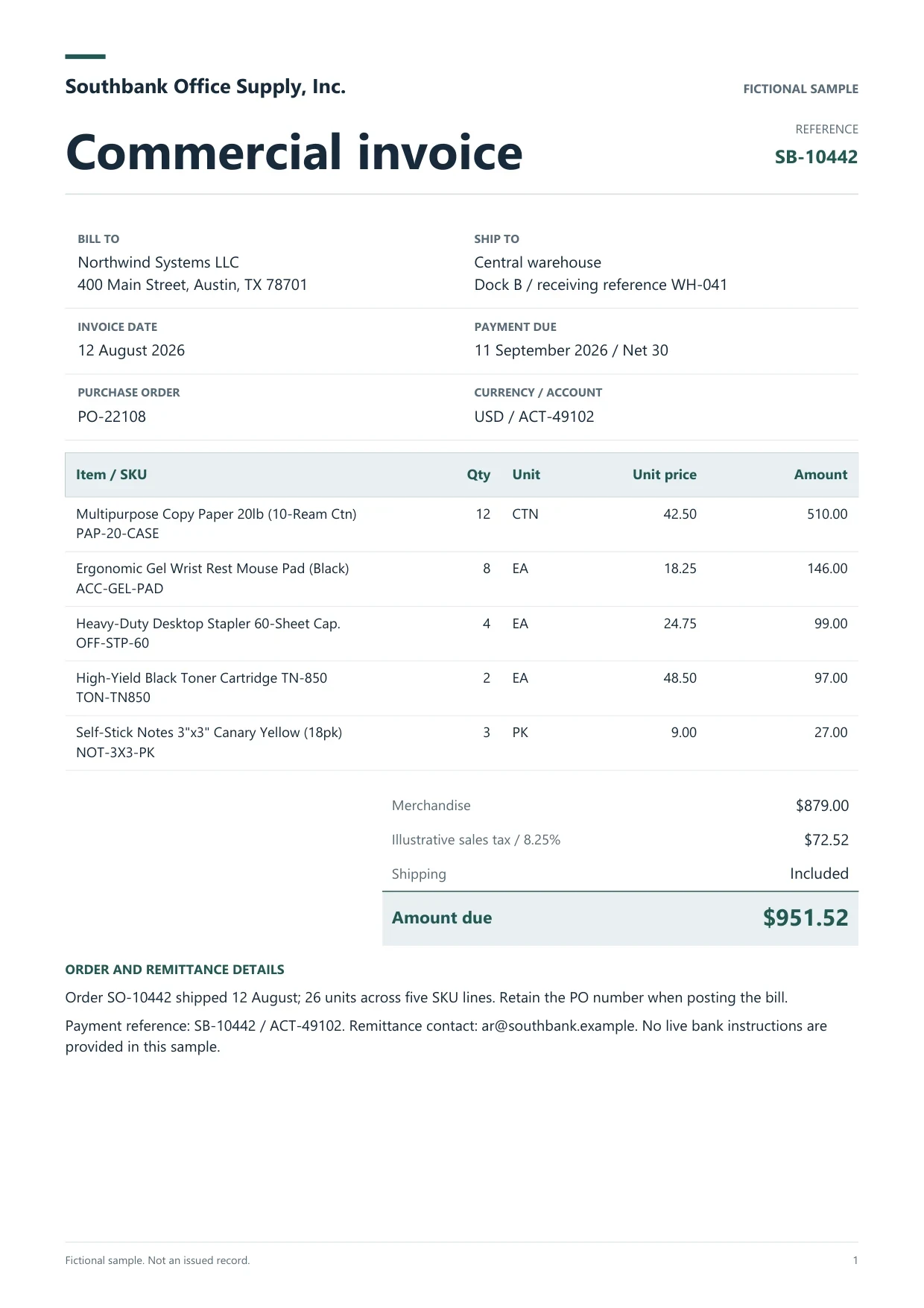
Sample commercial invoice
Source document(drag to dropzone)Page 1
Sample extracted data3 fields
Answer in 30 seconds

Staff save files to device storage, then upload in the workspace.
Share the private intake address from Pro or Scale settings.

Same invoice validation as any other channel.

Hand off reviewed rows to AP or accounting integrations.
 PDF invoicesPhotos of bills
 Credit notesStatements
Document the channel in a column so audits show deliberate upload, not a mystery bot.
Manual
Staff save PDF or image to device storage, then upload with intake method WhatsApp saved in notes.
Ask suppliers to email PDFs to your private forwarding address instead of only posting in groups.
Policy
Require named uploaders so group forwards do not enter the books without a reviewer.
 Dynamite Docs
Document how files entered:
Email attachment intake requires Pro or Scale. Starter relies on manual upload and Drive import within 25 files per job and 100 monthly page equivalents.
Pro allows 200 files per job with 1,000 page equivalents. Scale allows 500 files per job with 5,000 page equivalents.
Starter (Hobby) allows 25 files per job, 10 active jobs, 100 monthly page equivalents (PE), and 50 pages per document. Pro allows 200 files per job, 25 active jobs, 1,000 PE, and 500 pages per document. Scale (Ultra) allows 500 files per job, 50 active jobs, 5,000 PE, and 1,000 pages per document. Failed pages cost 0 PE.
Paid invoice intake · PRO and Scale
Forward invoice attachments to your private Dynamite Docs address. They are stored in your account, extracted automatically, and placed in the dashboard for review and export.
This page describes today’s product. Intake is manual save or email on eligible plans.
If you use external automation, you still must comply with data policy. No official WhatsApp connector ships with Dynamite Docs.
No. Only attachments are processed.
Yes after manual upload. Image quality affects OCR accuracy.
An intake register with channel, saver name, timestamp and reviewed status beside each file.

Ban silent chat forwards, enable email intake, and document who may upload.
Can we save optional cookies?
Essential cookies keep you signed in. Optional analytics and masked session replays help diagnose errors. Change your choice in Cookie settings. Privacy policy.