Hosted

Mixed invoice batches
Extract GST lines and TDS footer notes in one run, then split columns at export.
TDS appears on invoices, payment advice notes and Form 16A style certificates with different layouts per deductor. Dynamite Docs extracts the printed section, rate, PAN, base amount, TDS amount and reference numbers into review rows. Your tax reviewer owns section assignment, challan matching and return filing. Dynamite Docs does not file TDS returns.
By Dynamite Docs. Published . Updated .
Review and export GST data
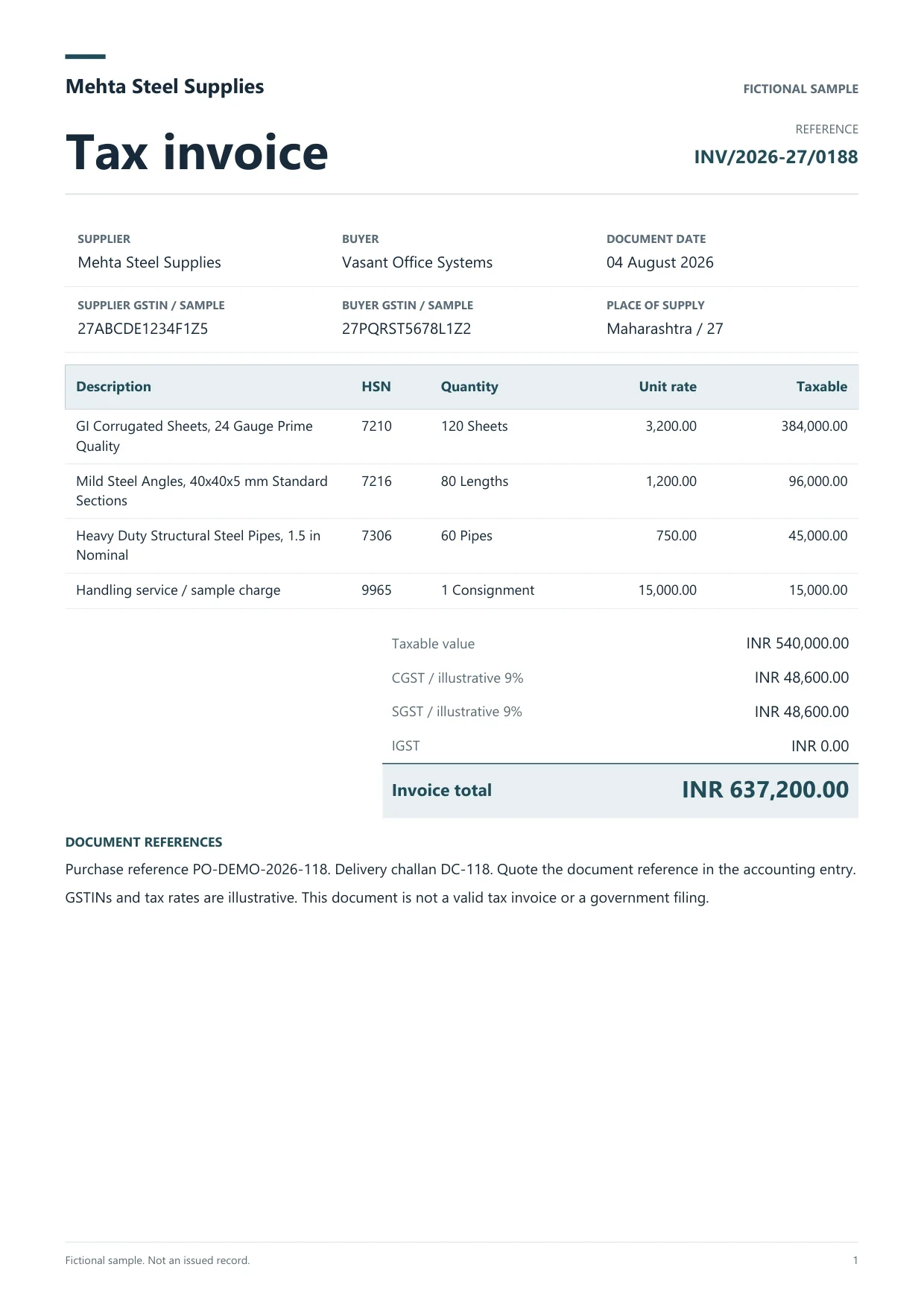
Sample GST tax invoice
Source document(drag to dropzone)Page 1
Sample extracted data4 fields
Answer in 30 seconds
Add PDFs, scans or photos. Include every page when the TDS note sits away from the tax table.

The extractor proposes section code, rate, PAN, base amount, TDS amount and document references as separate columns.

Check PAN format, rate against the printed note and arithmetic before the row enters a working schedule.
Download Excel, CSV or JSON for your section-wise schedule. Compare with 26AS and challan records in your existing process.
Purchase tax invoices Payment advice copiesTDS certificates
 Contractor bills
Keep GST extraction and TDS schedules parallel, not merged.
Hosted
Extract GST lines and TDS footer notes in one run, then split columns at export.
Jobs

Run up to 25, 200 or 500 files per job by plan with per-file review.
Export

Stable headers for 194C, 194J and other sections your reviewer tracks.
 Dynamite Docs
Capture the printed deduction evidence your reviewer needs:

Starter stores files and runs jobs with up to 25 files per job, 10 active jobs, 100 monthly page equivalents and 50 pages per document. Pro allows 200 files per job, 25 active jobs, 1,000 page equivalents and 500 pages per document. Scale allows 500 files per job, 50 active jobs, 5,000 page equivalents and 1,000 pages per document.
Any signed-in plan can connect a supported provider key. Pro and Scale own-key runs do not consume page equivalents. Section assignment and return filing stay with your tax reviewer.
Starter allows 25 files per job, 10 active jobs, 100 monthly page equivalents (PE), and 50 pages per document. Pro allows 200 files per job, 25 active jobs, 1,000 PE, and 500 pages per document. Scale allows 500 files per job, 50 active jobs, 5,000 PE, and 1,000 pages per document. Failed pages cost 0 PE.
No. It extracts and organizes printed TDS fields. Your team prepares challans, reconciles 26AS and files returns in the prescribed process.
Yes, when the deduction is visible on the document. Review TDS columns separately from CGST, SGST or IGST lines before export.
A qualified tax reviewer. The extractor records the printed section and rate; it does not decide whether that section applies.
Excel or CSV with stable column headers. Keep one workbook per client and period with links to source files.
Use separate sheets or files. Mixed columns confuse GSTR-2B work and TDS section totals.
Learn template-free invoice extraction with AI using Dynamite Docs. Review supplier fields, line items, tax, and totals across changing document layouts.
Run a bulk invoice extraction job in Dynamite Docs. Select stored files, check run status, retry failed invoices, and open results for review.

Upload three invoices with different TDS layouts, review PAN and amounts beside each source, and export a section-wise sheet for your filing workbook.
Can we save optional cookies?
Essential cookies keep you signed in. Optional analytics and masked session replays help diagnose errors. Change your choice in Cookie settings. Privacy policy.