Bulk voucher creation software for TallyPrime purchase invoices
Bulk voucher creation software turns a batch of reviewed invoices into TallyPrime vouchers in one pass. In Dynamite Docs, you stage up to 50 purchase invoices, check the party ledger, line ledgers, tax split and total for each, then download one XML file or post the batch to TallyPrime through the Windows companion.
By Dynamite Docs. Published . Updated .
Review and export GST data



Sample GST tax invoice
Source document(drag to dropzone)Page 1
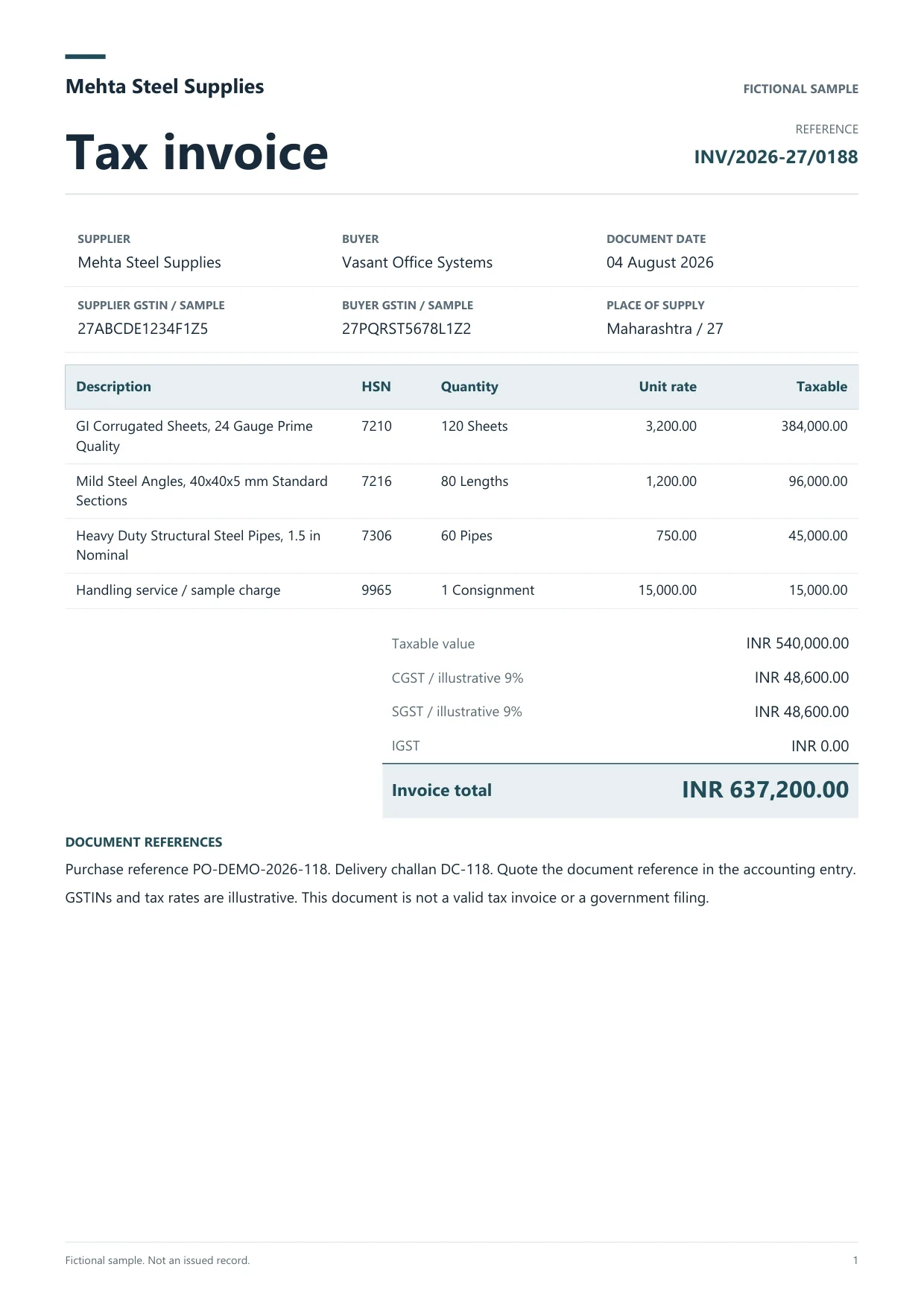
Sample extracted data4 fields
- Invoice number
- INV/2026-27/0188
- Supplier
- Mehta Steel Supplies
- Supplier GSTIN
- 27ABCDE1234F1Z5
- Invoice total
- INR 637,200.00
Answer in 30 seconds
Stage up to 50 reviewed purchase invoices as TallyPrime vouchers in Dynamite Docs, check ledgers and totals, then download XML or post via the companion.
How bulk voucher creation works

Extract and review the invoices
Upload the month’s purchase bills. Review supplier GSTIN, invoice number, date, taxable value and CGST, SGST or IGST beside each source.

Stage the batch
Select up to 50 reviewed extractions. Choose Accounting voucher or Item invoice mode, map source line columns for description, amount and tax rate, and say whether amounts are before tax or including tax.

Check each voucher
Confirm the supplier ledger, line ledgers or stock items, tax ledgers and voucher total. Where the source total is not available, tick that you checked the voucher total against the original invoice.

Download XML or post
Download one XML file for import, or with the Windows companion connected, post the batch. The companion checks masters and the Day Book first, then verifies each voucher after import.
What a bulk voucher batch can contain
GST purchase invoices Accounting vouchersItem invoicesMixed tax batches
What each staged voucher carries
 Dynamite Docs
- Voucher type
- Purchase
- Reference (supplier invoice number)
- INV/24-25/0144
- Voucher date
- 2026-08-02
Every voucher in the batch is built from reviewed values:
Requirements for bulk voucher creation
Tally XML export is available on Starter and above. Posting directly needs the Windows companion on the same machine as TallyPrime, with the HTTP server enabled on port 9000 and the target company open. The local TallyPrime connector guide covers that setup.
Extraction draws on your monthly page equivalents: 100 on Starter, 1,000 on Pro and 5,000 on Scale. Batch extraction jobs on stored files allow 25 files per job on Starter, 200 on Pro and 500 on Scale.
Questions, answered
Each batch holds 1 to 50 vouchers for one TallyPrime company. Split a larger month into several batches.
The batch staging view prepares purchase vouchers. Sales voucher XML can be prepared one invoice at a time in the Tally editor.
Within a batch, each voucher needs a distinct reference for the same party, date and type. Before import, the companion reads the Day Book for those dates and stops if a matching voucher is already there.
No. Bills that need reverse charge or TDS entries should be entered or adjusted in TallyPrime by the reviewer.
Extraction guides

Related document workflows

From the blog

Build a Tally invoice import workflow using AI-extracted data
Build a Tally import workflow with AI-extracted GST invoices from Dynamite Docs. Map reviewed rows to masters and voucher fields, then test and reconcile.
How to run and review a bulk invoice extraction job
Run a bulk invoice extraction job in Dynamite Docs. Select stored files, check run status, retry failed invoices, and open results for review.

Stage a small Tally batch
Extract five purchase bills, stage them as vouchers in a TallyPrime test company, and check the Day Book before you post a full month.