AI invoice processing software for reviewed invoice data
AI invoice processing software reads each invoice, proposes the supplier, invoice number, dates, line items, tax and total, and holds the result for review before it reaches accounting. Dynamite Docs automates that capture across changing layouts, flags values to check, and exports reviewed data to Excel, CSV, JSON or a connected system.
By Dynamite Docs. Published . Updated .
Export directly to your accounting software



Sample commercial invoice
Source document(drag to dropzone)Page 1
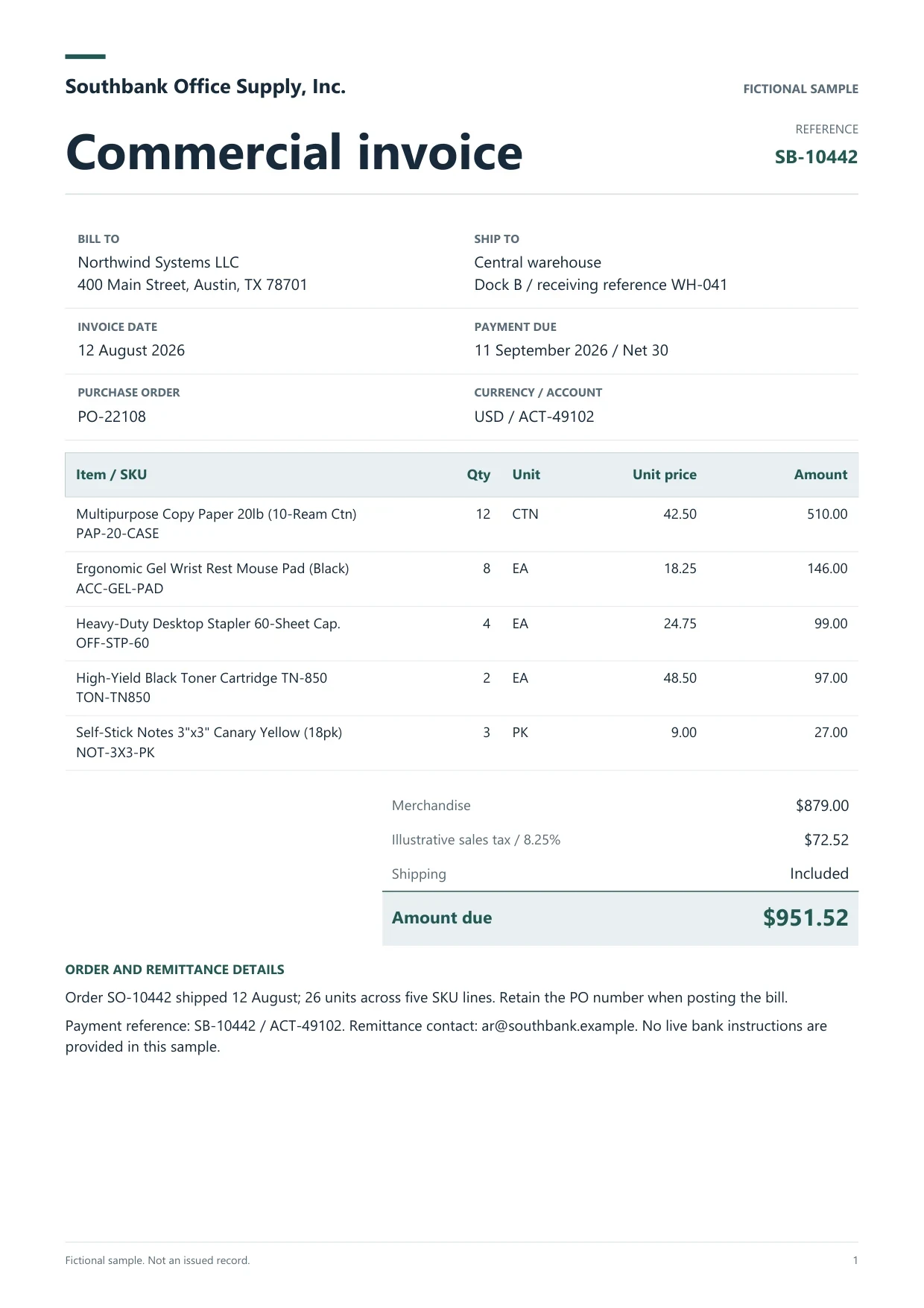
Sample extracted data3 fields
- Invoice number
- SB-10442
- Invoice date
- 12 August 2026
- Total due
- $951.52
Answer in 30 seconds
Dynamite Docs is AI invoice processing software that extracts headers, line items and tax from PDF, scanned and photographed invoices for review and export.
How automated invoice processing works in Dynamite Docs

Bring invoices in
Upload PDFs, scans or photos. Starter and above store files for batch jobs and can import from Google Drive. Pro and Scale can forward attachments to a private intake address.

Extract header fields and line items
The extractor proposes supplier, invoice number, dates, currency, line items, tax and total without a template per supplier.
Validate and review
Check that line items plus charges and tax reproduce the printed total, look for duplicate supplier and invoice-number pairs, and confirm flagged values beside the source.

Export or send
Download Excel, CSV or JSON, push to Google Sheets, or send reviewed bills to a connected accounting system after checking the destination mapping.
Invoice types in one processing queue
Supplier invoicesSales invoice copies Credit notesGST and VAT invoices
Invoice fields AI invoice processing captures
 Dynamite Docs
- Supplier name
- Southbank Office Supply
- Invoice number
- SB-10442
- Invoice date
- 2026-08-03
Request the header and line fields your process uses. A typical set includes:

Volume, plans and processing options
Free covers occasional invoices: up to 5 documents a day and 5 pages per document. Starter processes 100 page equivalents a month with batch jobs of up to 25 files. Pro covers 1,000 page equivalents with 200 files per job and email intake, and Scale covers 5,000 page equivalents with 500 files per job.
Any signed-in plan can connect a supported provider key. Pro and Scale own-key runs do not consume page equivalents, while provider charges still apply. Read the bulk invoice processing guide for the Jobs walkthrough.
Paid invoice intake · PRO and Scale
Fetch invoices from email.
Forward invoice attachments to your private Dynamite Docs address. They are stored in your account, extracted automatically, and placed in the dashboard for review and export.
- 01Invoice arrives
- 02Forward attachment
- 03Extract and review
- 04Export to your workflow
Questions, answered
Extraction captures the fields. Processing adds intake, validation, review and handoff around that capture. Dynamite Docs covers capture through handoff, while approval and payment stay in your accounting system.
No. Fields are proposed from the text and layout. Saved corrections can guide later runs, but check each new invoice against its source.
Export the supplier and invoice number together and compare them with earlier records for the same entity. Hold a revised or reissued invoice until it is linked to the original.
Starter and above run batch jobs on stored files: 25 files per job on Starter, 200 on Pro and 500 on Scale.
Extraction guides

Related document workflows

From the blog
How to run and review a bulk invoice extraction job
Run a bulk invoice extraction job in Dynamite Docs. Select stored files, check run status, retry failed invoices, and open results for review.
How to extract invoice data without vendor templates using AI
Learn template-free invoice extraction with AI using Dynamite Docs. Review supplier fields, line items, tax, and totals across changing document layouts.
How to validate totals and line items after AI invoice extraction
Learn how to validate AI-extracted invoices in Dynamite Docs. Recalculate quantities, prices, tax, and freight before exporting checked line items and totals.

Process a mixed invoice batch
Upload a digital PDF, a scan and a photographed invoice from different suppliers. Check the totals, resolve any duplicates, and export the reviewed rows.