Digital
Net banking PDF
Best column fidelity for HDFC, ICICI, Axis and SBI style tables.
A PDF bank statement to TallyPrime converter search usually means fast voucher entry. Dynamite Docs converts the PDF into dated rows you can check in Excel, then you apply your Tally mapping. It does not replace Tally bank allocation rules or create contra entries.
By Dynamite Docs. Published . Updated .
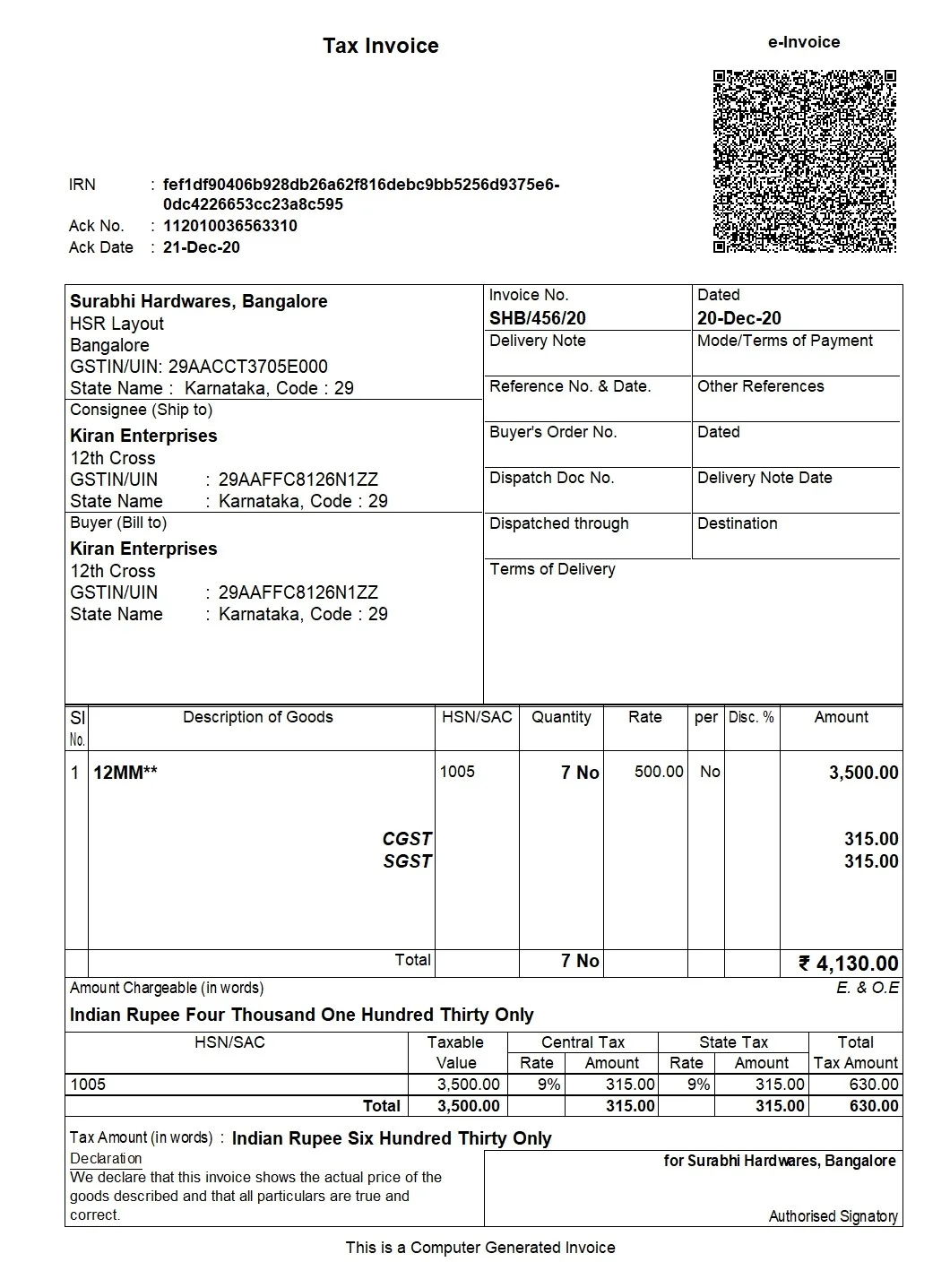
Review and export GST data
Sample tallyPrime E-Invoice
Source document(drag to dropzone)Page 1
Sample extracted data3 fields
Answer in 30 seconds
Use the original bank download, not a re-scanned print, when possible.

Split narrations, references and amounts into columns with consistent date formats.
Run balance checks on the full period. Hold the file if pages are missing.

Download Excel and apply your import template. Posting stays in Tally after review.
 Net banking PDFs
 Consolidated PDFsScanned PDFs
 Credit card PDFs
Prefer native downloads over rescans when the bank allows it.
Digital
Best column fidelity for HDFC, ICICI, Axis and SBI style tables.
Scan

Supported with extra review; each successful page uses PE.
Export

Excel output aligned to your TallyPrime import template columns.
 Dynamite Docs
Align these with your Tally Excel template:
Each processed statement page uses one page equivalent on success. Pro allows up to 500 pages per file and 1,000 monthly page equivalents. Scale allows 1,000 pages per file and 5,000 monthly page equivalents.
Starter supports shorter statements with 50 pages per file and 100 monthly page equivalents.
Starter allows 25 files per job, 10 active jobs, 100 monthly page equivalents (PE), and 50 pages per document. Pro allows 200 files per job, 25 active jobs, 1,000 PE, and 500 pages per document. Scale allows 500 files per job, 50 active jobs, 5,000 PE, and 1,000 pages per document. Failed pages cost 0 PE.
Paid invoice intake · PRO and Scale
Forward invoice attachments to your private Dynamite Docs address. They are stored in your account, extracted automatically, and placed in the dashboard for review and export.
The accounting workflow adds balance reconciliation, storage and batch jobs on paid plans. The free tool is for quick table exports without vault storage.
No. You import mapped Excel using TallyPrime procedures.
Remove the password in your bank portal and upload an unlocked PDF.
No. Contra and payment vouchers are outside product scope.
Starter allows 50 pages per file. Split long downloads or use Pro for 500 pages per file.
This page owns the converter intent for PDF bank statements into reviewed rows before TallyPrime mapping. Dynamite Docs does not create payment or contra vouchers. Compare invoice Tally tools separately in TrulyInvoice vs Vyapar TaxOne.

Upload last month’s PDF, reconcile balances, and export Excel for your Tally mapping test.
Can we save optional cookies?
Essential cookies keep you signed in. Optional analytics and masked session replays help diagnose errors. Change your choice in Cookie settings. Privacy policy.