AI financial data extraction from statements and trial balances
AI financial data extraction reads financial statements, trial balances and supporting schedules, and returns each account line with its code, period and amounts in separate columns. Dynamite Docs keeps opening, movement and closing figures apart, preserves signs and units, and holds every row for review before it reaches a workbook, model or audit file.
By Dynamite Docs. Published . Updated .
Export directly to your accounting software



Sample commercial invoice
Source document(drag to dropzone)Page 1
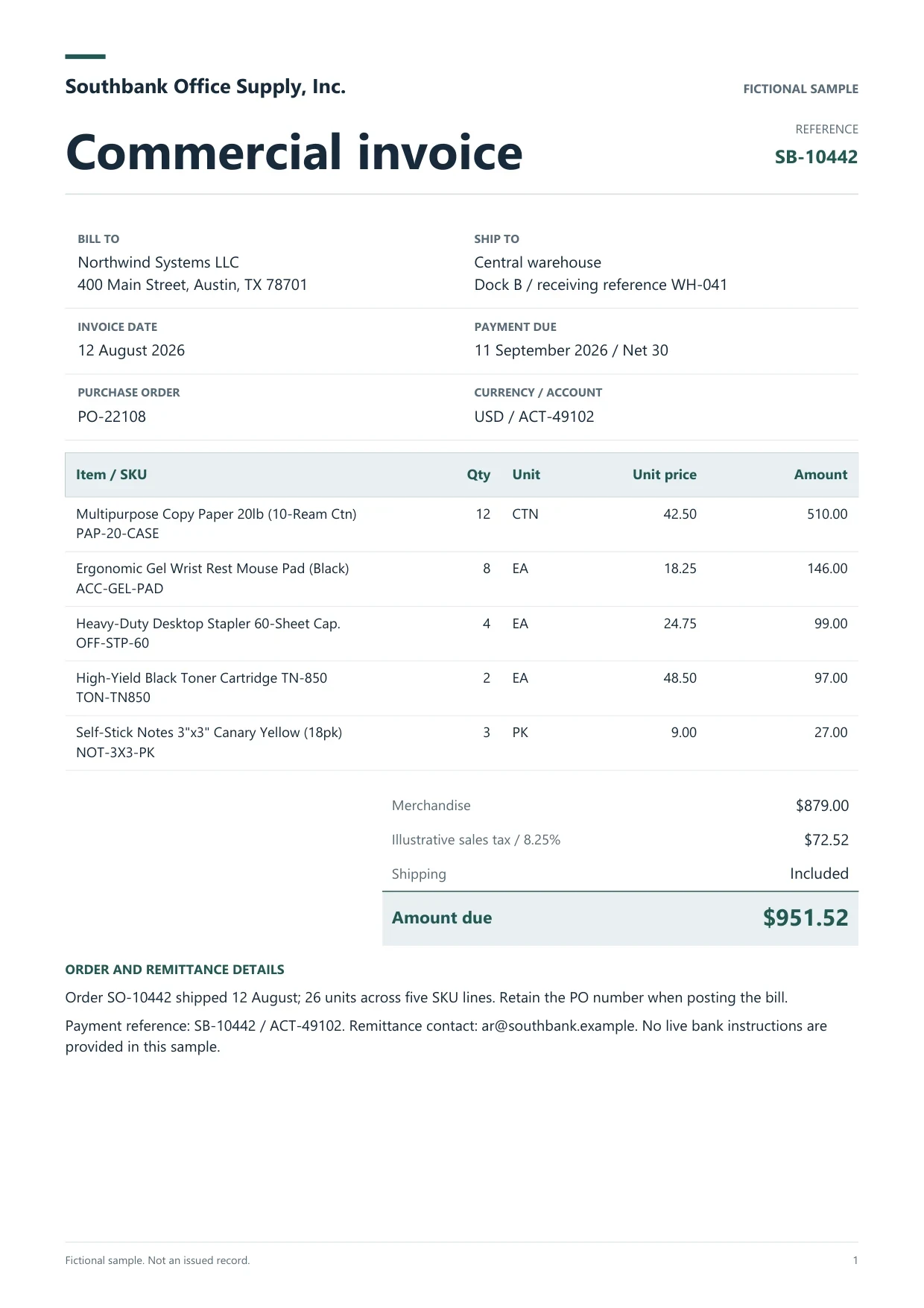
Sample extracted data3 fields
- Invoice number
- SB-10442
- Invoice date
- 12 August 2026
- Total due
- $951.52
Answer in 30 seconds
Use Dynamite Docs for AI financial data extraction: turn trial balances, balance sheets and P&L statements into checked rows for analysis and audit files.
How AI financial data extraction works

Upload the statement or trial balance
Add digital PDFs or scans of trial balances, balance sheets, income statements, cash flow statements and notes. Include every page of multi-page schedules.

Extract account lines and periods
The extractor proposes account code, description and each amount column as printed, with the column heading attached so periods stay separate.
Tie out the totals
Check that debits equal credits on a trial balance, assets equal liabilities plus equity on a balance sheet, and subtotals add up to the printed totals.

Export for analysis
Download reviewed rows to Excel, CSV or JSON for lead schedules, variance analysis or a financial model.
Financial documents this workflow reads
 Trial balances
 Balance sheets
 Income statements
 Cash flow statements and notes
Financial statement fields to request
 Dynamite Docs
- Entity
- Brightline Media Inc
- Statement type
- Trial balance
- As-at date
- 2026-08-31
Request one row per account line, with these columns:
Plans and page limits for financial documents
Free processes up to 5 pages per document, which covers many single-entity trial balances. Starter allows 50 pages per document, Pro 500 and Scale 1,000, for annual reports and long schedules.
Financial statements are sensitive. Check the privacy policy, connect your own provider key, or on Starter and above run inference locally through the Windows companion.
Questions, answered
Yes, within the page limit of your plan. Select the statement pages you need and check each table header so periods are not mixed.
Request numeric amounts and check that bracketed and minus-sign figures come through as negatives. Review every closing balance on scanned pages.
Extract each statement separately with its period, then combine the reviewed exports in your workbook using the account code as the key.
It prepares the figures. Ratio analysis, credit decisions and judgments about the statements stay with the analyst.
Extraction guides

Related document workflows

From the blog

AI extraction for audit working papers
Learn how auditors prepare working papers with AI extraction using Dynamite Docs. Review invoice and statement rows against source evidence before testing.

How to extract multi-page PDF tables and join continued rows using AI
Learn multi-page PDF table extraction with AI using Dynamite Docs. Join continued rows, remove repeated headers, and check the table against source pages.
How to extract PDF tables using AI without losing row structure
Learn how to extract PDF tables with AI using Dynamite Docs. Preserve row structure, review OCR errors and columns, then export checked spreadsheet data.

Extract one trial balance
Upload a trial balance or balance sheet, tie the extracted totals to the printed totals, and export the reviewed rows to your lead schedule.