Free

PDF to Excel tool
One file at a time without cloud storage. Best for ad hoc table grabs when you do not need retries or a job register.
Open free toolPDF to Excel automation turns repeating table exports into batch jobs with review. Try the free PDF to Excel tool for a single file. Move to stored batch jobs on Starter and above when you need audit trails, retries and up to 25, 200 or 500 files per job.
By Dynamite Docs. Published . Updated .
Export directly to your accounting software
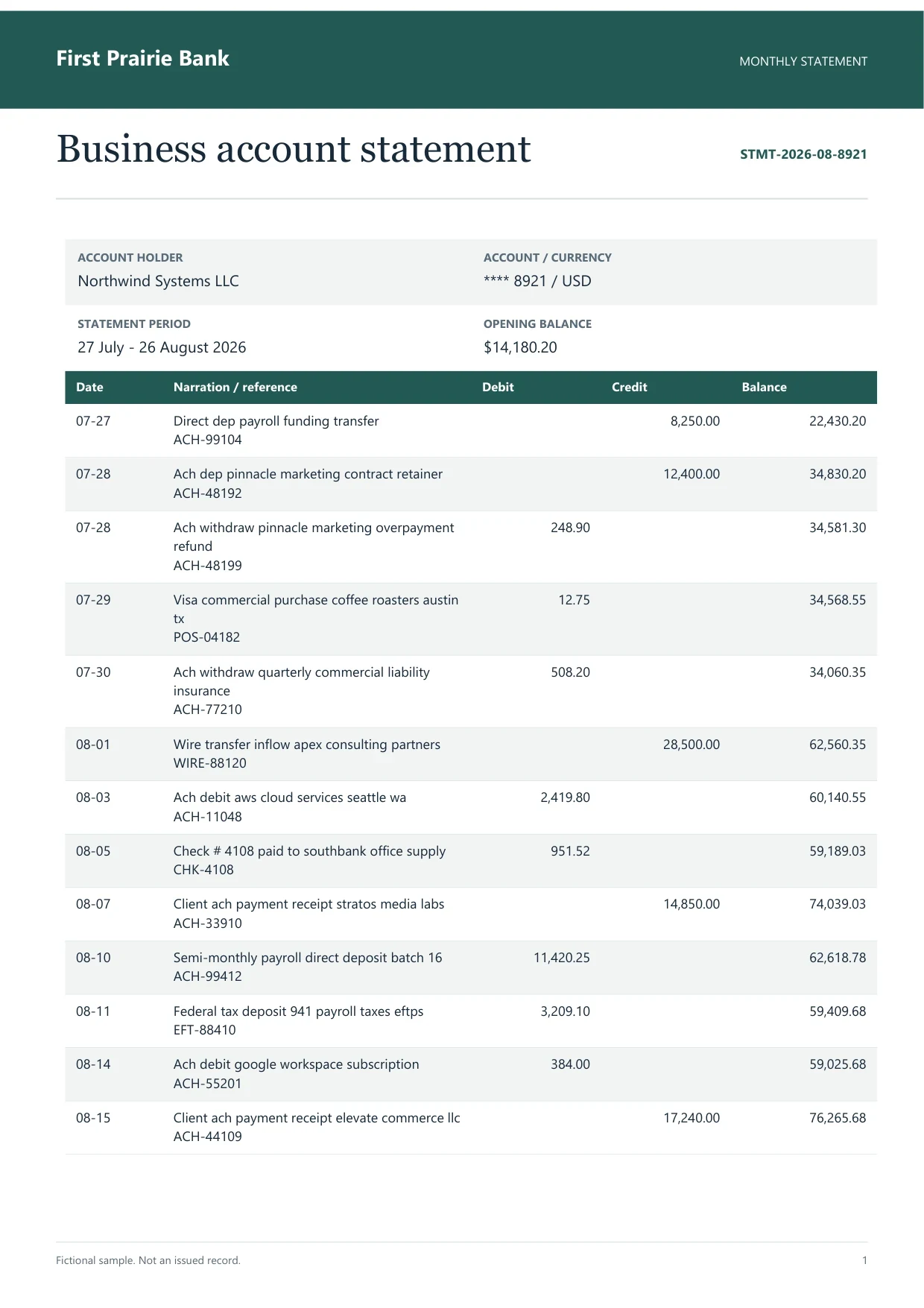
Sample bank statement
Source document(drag to dropzone)Page 1
Sample extracted data3 fields
Answer in 30 seconds

Use the free tool for one-offs. Sign in and store files for automation.

AI proposes rows and headers without fixed templates per supplier.

Tie subtotals and tax before export.

Download Excel or CSV, or push to Google Sheets when connected.
 Invoices
 Bank statements
 Trial balances
 PO grids
Choose the path based on audit trail needs, not convenience alone.
Free
One file at a time without cloud storage. Best for ad hoc table grabs when you do not need retries or a job register.
Open free toolSigned in
Keep corrections and patterns in the workspace. Free tier stays browser-only; Starter adds vault storage.
Jobs
Name a job, select up to 25, 200 or 500 files per run by plan, and retry failures without re-uploading sources.
Bulk PDF processing Dynamite Docs
Stable headers help downstream formulas:

Starter: 25 files per job, 50 pages per document, 100 monthly page equivalents. Pro: 200 files per job, 500 pages per document, 1,000 page equivalents. Scale: 500 files per job, 1,000 pages per document, 5,000 equivalents.
Each successful page costs one page equivalent.
Starter (Hobby) allows 25 files per job, 10 active jobs, 100 monthly page equivalents (PE), and 50 pages per document. Pro allows 200 files per job, 25 active jobs, 1,000 PE, and 500 pages per document. Scale (Ultra) allows 500 files per job, 50 active jobs, 5,000 PE, and 1,000 pages per document. Failed pages cost 0 PE.
For single files yes. Automation needs Starter+ for stored batch jobs.
It exports values into Excel. Add formulas in your workbook after review.
Select many stored files in one job within plan file limits.
Unlock PDFs before upload. Protected files may fail extraction.
Save a pattern after the first clean export and reuse it for the same supplier layout each month.
Learn how to extract PDF tables with AI using Dynamite Docs. Preserve row structure, review OCR errors and columns, then export checked spreadsheet data.
Run a bulk invoice extraction job in Dynamite Docs. Select stored files, check run status, retry failed invoices, and open results for review.

Run one file in the free tool, then repeat the same PDF in a Starter job to see review and retry differences.
Can we save optional cookies?
Essential cookies keep you signed in. Optional analytics and masked session replays help diagnose errors. Change your choice in Cookie settings. Privacy policy.