AP

Supplier invoices
Focus on PO references, tax and duplicate supplier numbers. Hand off to accounts payable review after export.
Invoice processing automation is the operational spine: how files arrive, how jobs run, how duplicates are caught and how reviewed data leaves the platform. AI invoice processing software explains the extraction technology. This page owns the automation workflow keyword.
By Dynamite Docs. Published . Updated .
Export directly to your accounting software
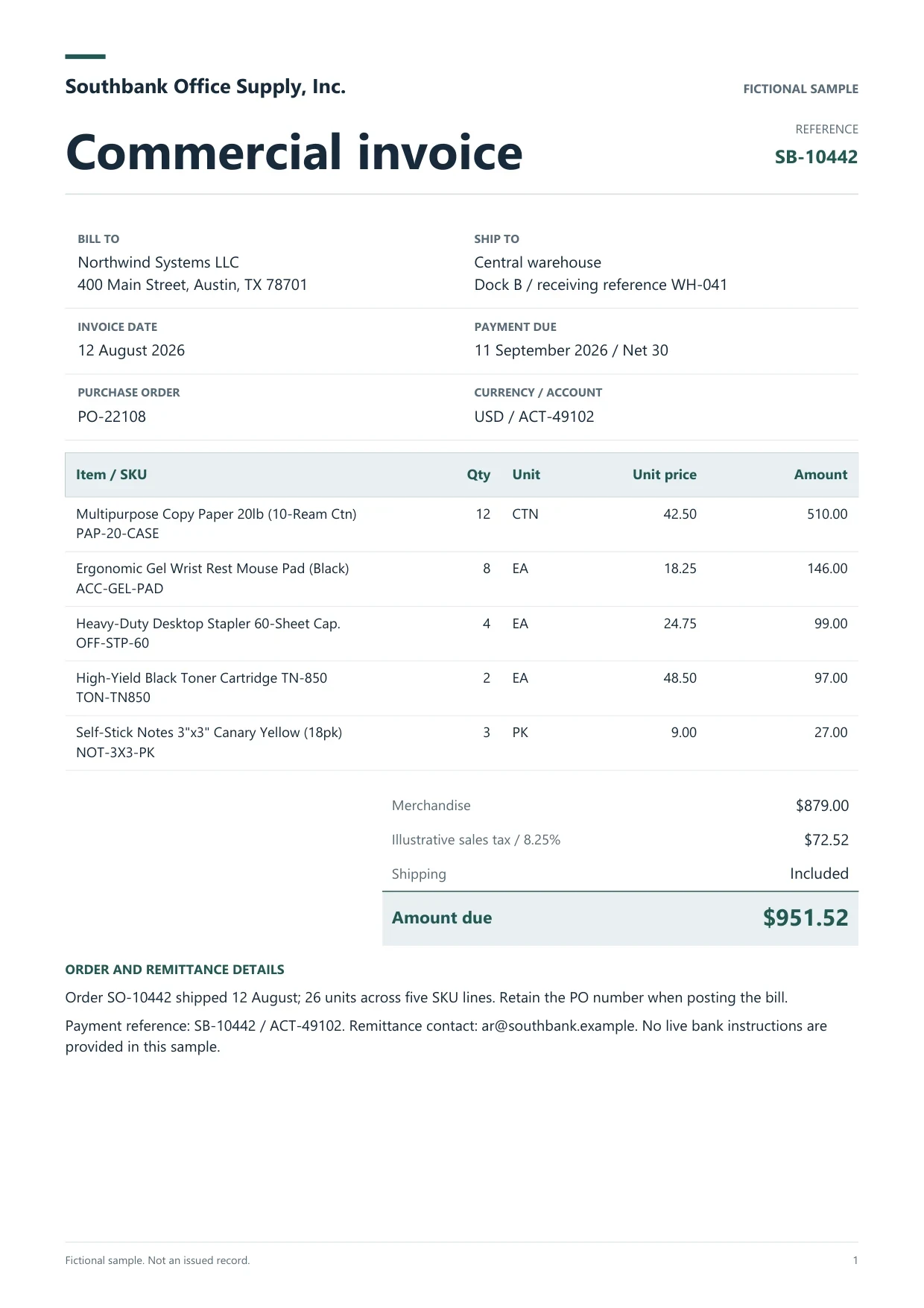
Sample commercial invoice
Source document(drag to dropzone)Page 1
Sample extracted data3 fields
Answer in 30 seconds

Upload, Drive import, or email forwarding on Pro and Scale into one workspace.

Starter and above run jobs with per-file status and retries.

Check line math, tax and supplier-invoice pairs before approval.

Push reviewed batches to Excel, Sheets or AP integrations on your cadence.
 Email attachmentsScanned mail
 Vendor portalsMobile photos
Each variant keeps the same four workflow stages but different reviewers.
AP
Focus on PO references, tax and duplicate supplier numbers. Hand off to accounts payable review after export.
AR
Build outward registers and tie to remittances. Export separately from payables even when extraction settings match.
Adjustments
Link each note to its original invoice in the reviewer notes column before posting.
Run each channel through the same validation checklist so AP sees one register per period.
Upload

Signed-in users upload PDFs, scans and photos. Starter and above import from Google Drive into stored files before batch jobs.
Forward supplier emails to a private address. Only attachments are extracted, not message bodies. Track each file under Imported via email.
Jobs
Queue many stored files with retries and per-file status. Review every completed result before you export the batch.
 Dynamite Docs
Operational columns automation teams monitor:
Starter processes 25 files per job with 100 monthly page equivalents. Pro allows 200 files per job, email intake and 1,000 page equivalents. Scale allows 500 files per job and 5,000 page equivalents.
Document page caps are 50, 500 and 1,000 respectively.
Starter (Hobby) allows 25 files per job, 10 active jobs, 100 monthly page equivalents (PE), and 50 pages per document. Pro allows 200 files per job, 25 active jobs, 1,000 PE, and 500 pages per document. Scale (Ultra) allows 500 files per job, 50 active jobs, 5,000 PE, and 1,000 pages per document. Failed pages cost 0 PE.
Pro and Scale own-key runs do not consume PE. Provider charges and availability still apply.
Paid invoice intake · PRO and Scale
Forward invoice attachments to your private Dynamite Docs address. They are stored in your account, extracted automatically, and placed in the dashboard for review and export.
AI invoice processing covers extraction capability. This page covers intake-to-export workflow automation.
No. Export reviewed data. Payment approval stays in your AP system.
Yes. Pro and Scale include inbound attachment processing.
Run jobs manually or via API tokens where your plan allows. No hidden scheduler without your trigger.
Use separate folders, job names and export files even when the same extraction settings apply. Mixing registers causes duplicate and remittance errors at month-end.
Run a bulk invoice extraction job in Dynamite Docs. Select stored files, check run status, retry failed invoices, and open results for review.
Learn how to validate AI-extracted invoices in Dynamite Docs. Recalculate quantities, prices, tax, and freight before exporting checked line items and totals.

List every intake path, run one combined job, and export a single approved batch.
Can we save optional cookies?
Essential cookies keep you signed in. Optional analytics and masked session replays help diagnose errors. Change your choice in Cookie settings. Privacy policy.