Email to document automation for invoices and receipts
Email to document automation turns invoices and receipts that arrive by email into extracted, reviewable data without downloading and uploading each file. On Pro and Scale, Dynamite Docs gives you a private forwarding address. Forward an email to it, and each PDF or image attachment is saved to your library, extracted, and held for review before export.
By Dynamite Docs. Published . Updated .
Export directly to your accounting software



Sample commercial invoice
Source document(drag to dropzone)Page 1
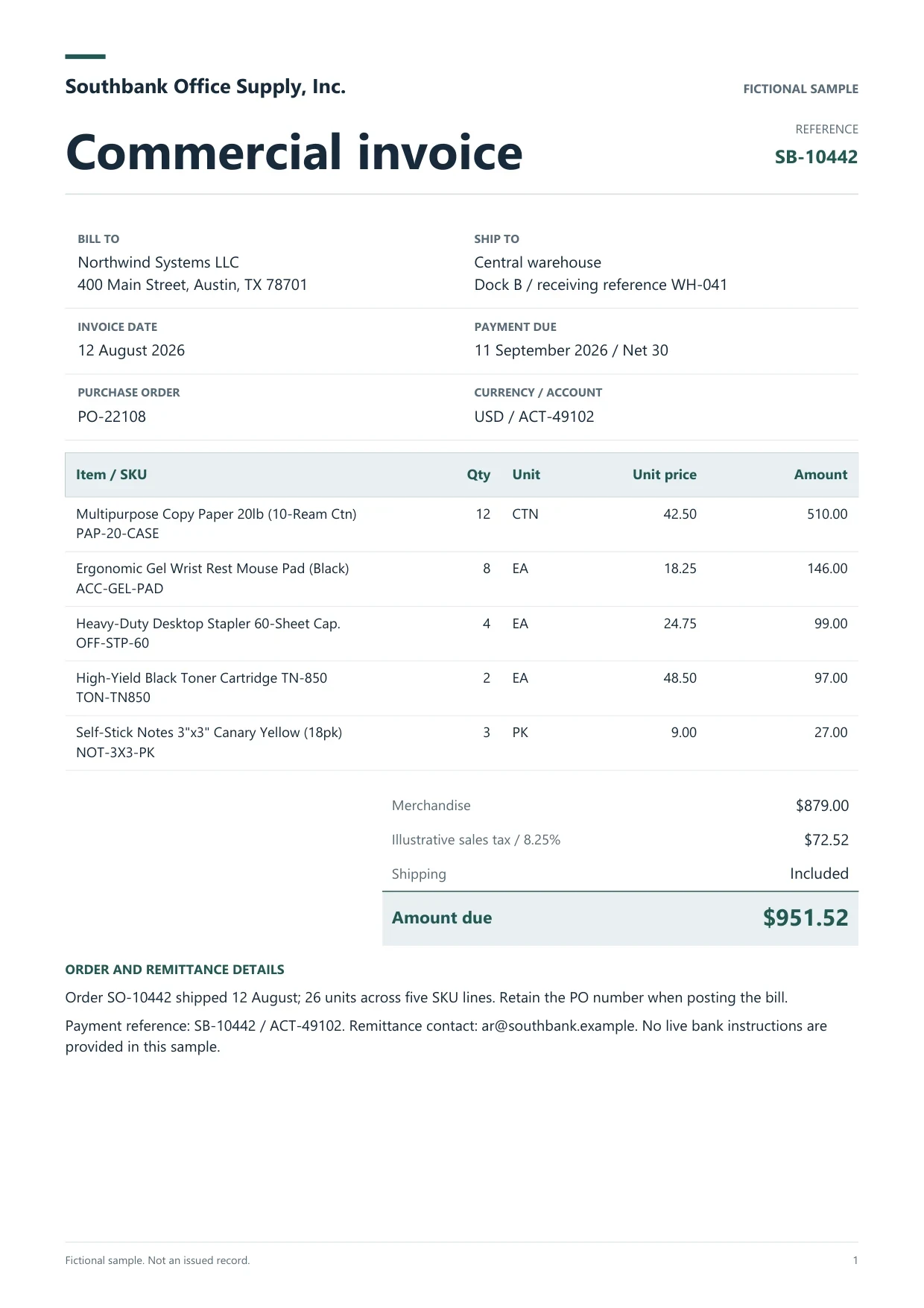
Sample extracted data3 fields
- Invoice number
- SB-10442
- Invoice date
- 12 August 2026
- Total due
- $951.52
Answer in 30 seconds
Forward invoices and receipts to a private Dynamite Docs address. On Pro and Scale, PDF and image attachments are saved, extracted and held for review.
How email to document automation works

Copy your private forwarding address
In the workspace, open Email inbox from Apps. The Email capture window shows your private forwarding address and a Copy button. The address is available on Pro and Scale.
Forward the email with its attachments
Forward a supplier email, or send a receipt photo from your phone, to that address from any mail app. PDF, PNG, JPEG, WEBP and TIFF attachments are accepted.
Let extraction start on its own
Each supported attachment is saved to your cloud library and queued for extraction. The address that sent the email gets a short reply with the number of files being extracted.

Review and export the results
Open the file from Imported via email, and use Refresh to update the list. Check the fields and warnings against the source, then export to Excel, CSV or JSON, push to Google Sheets, or receive a signed webhook.
Documents that usually arrive by email
 Supplier invoices
 Expense receipts
 Bank and card statementsScan-to-email output
What each emailed attachment records
 Dynamite Docs
- Source
- File name
- NW-88231-freight-bill.pdf
- Received
- 18 Nov 2026, 09:42
Every attachment that is accepted becomes its own file with:
Plans that include email capture
Email capture is included on Pro and Scale subscriptions. Pro includes 2 GB of cloud storage and 1,000 PE a month, and Scale includes 10 GB and 5,000 PE. Free and Starter do not include a forwarding address. On those plans, upload files in the workspace, or import them from Google Drive on Starter.
Pro and Scale also include REST API tokens and signed webhooks, so a completed extraction can notify your own system. See plans and processing limits for current numbers.
Questions, answered
Pro and Scale subscriptions. Free and Starter accounts do not get a forwarding address and upload files in the workspace instead.
PDF, PNG, JPEG, WEBP and TIFF files. Other attachments, such as Word or Excel files, are skipped. Upload those in the workspace instead.
No. Only attachments are processed. If an invoice sits in the email body, save it as a PDF and forward or upload that file.
Dynamite Docs has no WhatsApp intake. Save the file from WhatsApp, then email it to your forwarding address or upload it in the workspace.
Anyone who has the address. It is random and hard to guess, so share it only with people and systems you trust.
An attachment that does not fit is skipped and not extracted. Delete files you no longer need or move to a plan with more storage.
Extraction guides

Related document workflows
From the blog
How small businesses process expense receipts using AI OCR
Learn how small businesses process receipts with AI OCR using Dynamite Docs. Check merchant, date, tax, tip, and total before preparing expense records.
How to run and review a bulk invoice extraction job
Run a bulk invoice extraction job in Dynamite Docs. Select stored files, check run status, retry failed invoices, and open results for review.
How to read handwritten receipts with AI OCR
Learn how to read handwritten receipts with AI OCR using Dynamite Docs. Check faint digits, tips, and totals against the source before expense exports.

Forward one test email
Send one PDF bill and one receipt photo to your forwarding address, review both results, and check the totals before you route a whole inbox.