


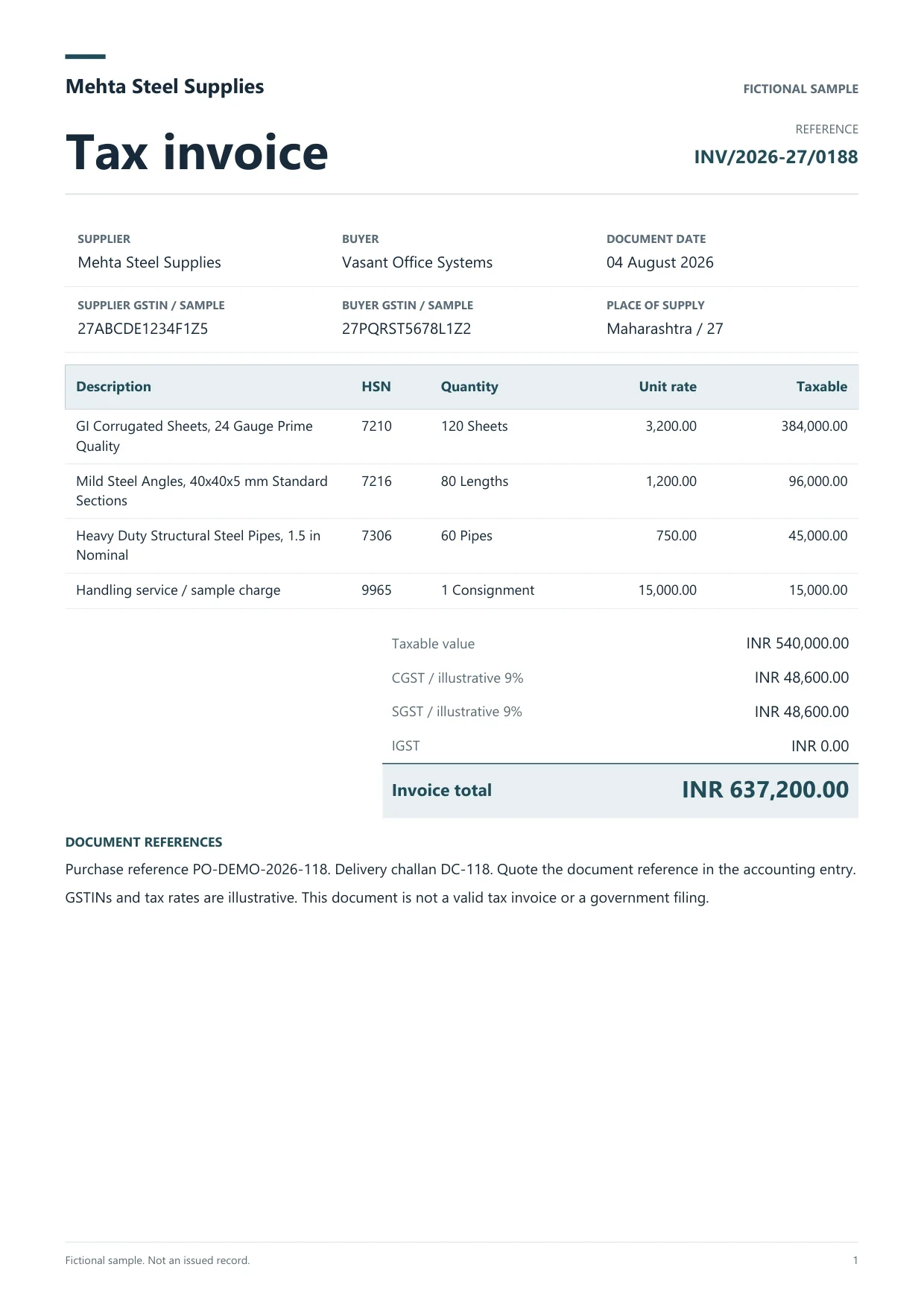
AI for chartered accountants and CA offices in India starts with one client and one accounting period. Take a purchase bill that arrived as a photo, a sales invoice PDF and the bank statement for that month. Dynamite Docs turns those documents into editable fields and rows. Use the invoices for voucher preparation and the statement for your reconciliation worksheet.
Keep the client, company and period visible from upload through handoff. An invoice number can repeat across suppliers, and a bank narration can wrap across a page break. Give a second reviewer enough information to find the source and resolve the exception before the figures move into the books. Your firm still owns GST portal actions, input tax credit decisions, filing and sign-off.
PDF & image OCR for AI accounting

Document parser for AI accounting
Read supplier bills from digital PDFs, scans or photos. The parser proposes named fields such as GSTIN, invoice number and date, and keeps repeating items in a table with HSN or SAC, quantity, unit rate and taxable value. Check cropped totals and faint digits against the original.

Sales invoices
Keep invoice number, recipient GSTIN, date and printed tax split with the sales rows. Preserve leading zeroes and punctuation in the reference so it stays usable in the client’s register and subsequent checks.

Indian bank statements
Read transaction dates, full narrations, debits, credits, references and running balances from a statement PDF. Inspect page breaks for missing or repeated rows before exporting the workbook.
Review a sample GST invoice
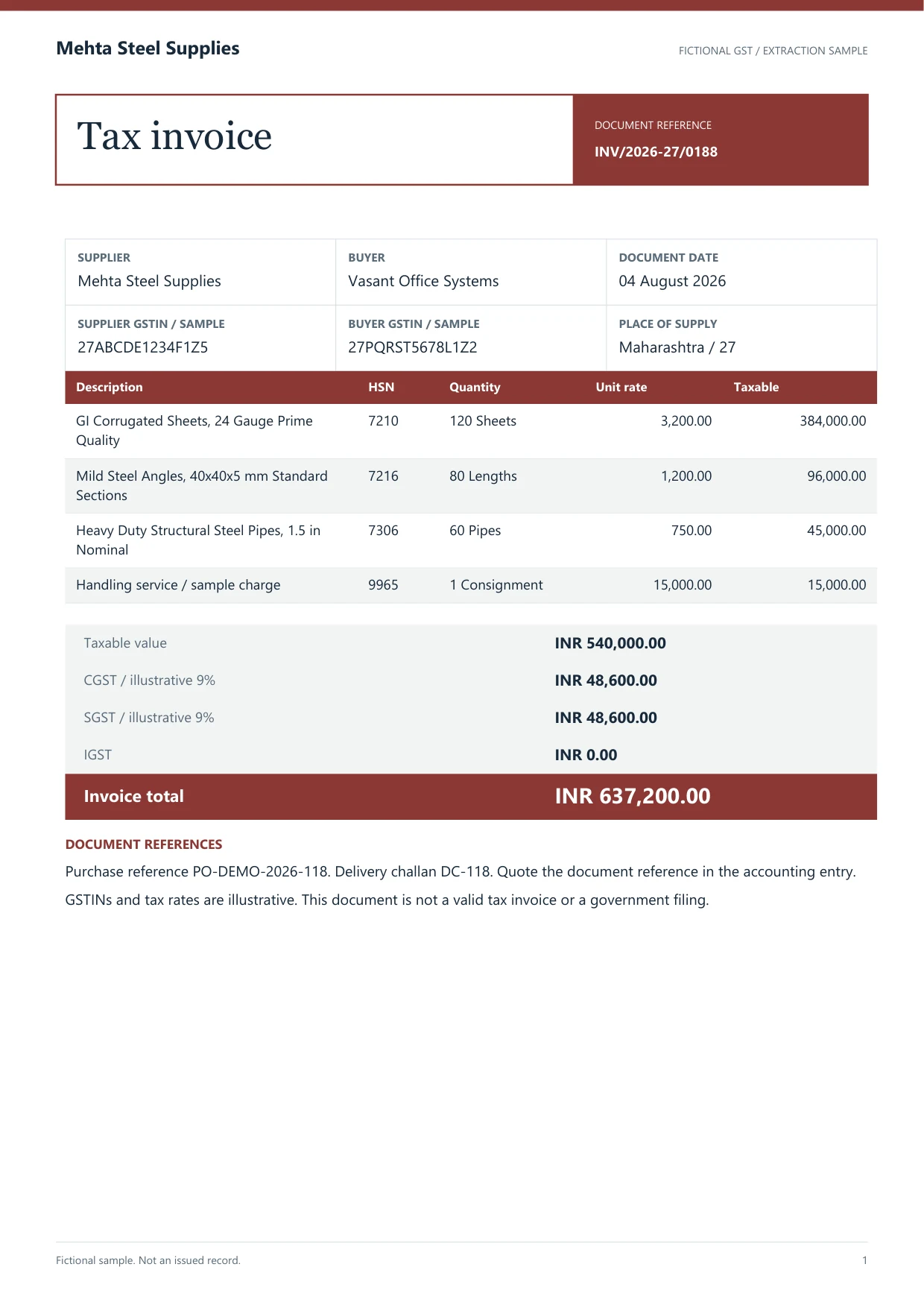
This fictional invoice has a preloaded draft with two mistakes. Check the bill, correct the CGST and supplier ledger, then download the reviewed workbook or sample purchase voucher.
Read the printed values
Supplier Mehta Steel Supplies. Taxable ₹5,40,000.00. CGST and SGST ₹48,600.00 each. Total ₹6,37,200.00.
Purchase voucher draft
Invoice INV/2026-27/0188. Sample company Dynamite Docs Demo.
See a purchase voucher verified in TallyPrime
In the 16 November 2026 QA run, a separate fictional GST purchase voucher, DDQA-P002, imported with one voucher created and zero errors. The same reference appeared in the test company’s Day Book. A separate batch check rejected a missing ledger before posting.
- Supplier ledger
- QA Supplier
- Voucher total
- ₹1,180.00
- Freight debit
- ₹1,000.25
- CGST and SGST debits
- ₹90.02 each
- Rounding credit
- ₹0.29
- Day Book reference
- DDQA-P002
Check a GST invoice before preparing the voucher
The fictional Mehta Steel sample has four lines. Their taxable amounts add up to ₹5,40,000. The printed CGST and SGST amounts bring the invoice total to ₹6,37,200. Use the reference workbook to compare the captured values with the PDF.
| Value to verify | Sample value | Reviewer check |
|---|---|---|
| Invoice number | INV/2026-27/0188 | Keep the number and punctuation as printed. |
| Taxable value | ₹5,40,000.00 | Add the four line amounts, including the handling charge. |
| CGST and SGST | ₹48,600.00 each | Check the two printed amounts separately. |
| Invoice total | ₹6,37,200.00 | Tie the taxable value and both tax amounts back to the PDF. |
Review against the source
 Dynamite Docs
- Value to verify
- Invoice number
- Sample value
- INV/2026-27/0188
- Reviewer check
- Keep the number and punctuation as printed.

- Compare the supplier GSTIN and full invoice number with the source. Use both when checking for duplicates in the purchase register.
- Add the item lines and verify the printed tax splits and final total. If a photographed bill is cut off, request a complete copy before accepting the row.
- For a bank statement, reconcile opening balance plus credits less debits to closing balance. Check the first and last transaction on each page.
- Put unclear invoices and statement movements on the client’s exception list. Record the source reference and the question a reviewer needs to resolve.
Handoff steps
Dynamite Docs- 01Review one client’s source documents
- 02Prepare the invoice handoff to TallyPrime
- 03Prepare the bank reconciliation worksheet
- 04Hand off purchase rows for GSTR-2B matching

Review one client’s source documents
Upload a representative bill or statement. Correct shifted amounts, truncated item descriptions and wrapped narrations while the original is visible. Confirm the document count and keep separate registers for each client and period.
Prepare the invoice handoff to TallyPrime
On Starter and above, review the company, party ledger, voucher date and totals. Download purchase or sales voucher XML. With the Windows companion connected to TallyPrime, confirm the supplier ledger and post a reviewed purchase voucher. Start in a test company and inspect what landed.

Prepare the bank reconciliation worksheet
Use the reviewed bank workbook to match transactions in the client’s existing process. Retain the original narration alongside any ledger code. Investigate transfers or similar amounts with the transaction reference and counterparty before clearing a match. See the sample statement PDF and its reviewed Excel output.
Hand off purchase rows for GSTR-2B matching
Keep supplier GSTIN, invoice number, date, taxable amount and the printed tax split in the purchase worksheet. Compare those rows with the client’s downloaded GSTR-2B in your usual reconciliation workflow and assign the exceptions to a reviewer. GSTN matching tool guide (opens in a new tab)
Export and handoff
Use Excel or CSV for registers, payment checks and client working papers. For a TallyPrime workbook import, use a mapping template that matches your client’s company (opens in a new tab). Keep a copy of the reviewed output and the source with the period’s working papers.
Processing choices and allowances
Choose hosted AI, your own provider keys, or local Ollama on an eligible plan. Each successfully processed hosted page uses one PE. Free and Starter BYOK use the same PE allowance; Pro and Scale BYOK cost zero PE, with provider charges and limits still applying. Failed pages cost zero PE.
Check current plans, page limits, and capabilities and review storage and data-residency policies before processing sensitive records. Local model inference is a separate choice from browser-local file storage.
Workflow boundaries
- Bank statement extraction produces reviewed transaction rows. Assign receipt, payment and contra vouchers in your existing accounting workflow.
- Your firm owns GST portal actions, input tax credit decisions, filing and sign-off. Use the extracted fields as evidence for that work.
Related guides
Extract GST invoice fields for TallyPrime
See which printed invoice fields and line items to check at intake.
Review and export TallyPrime vouchers
Check the company and ledger mapping before handing off a voucher.
Convert an Indian bank statement to Excel
Review dates, narrations, transaction signs and running balances.
Prepare purchase rows for GSTR-2B matching
Build a register for your firm’s reconciliation and exception review.
Create TallyPrime purchase vouchers in bulk
Stage up to 50 reviewed bills, check ledgers and post or download XML.

Prepare vouching schedules for audit
Compare extracted bills with the purchase register and GSTR-2B.
Compare Dynamite Docs and Vyapar TaxOne
Review the differences in invoice posting, bank automation and GST workflows.
Compare TrulyInvoice and Vyapar TaxOne
Shortlist TallyPrime purchase tools before a multi-client pilot.
Compare TallyPrime and Zoho Books
Choose the ledger before you standardize invoice intake.
Questions about this workflow
Can I review a supplier bill photographed on a phone?
Yes. Upload the image and check that the GSTIN, item table and totals are legible. If glare or a cropped edge hides a figure, use a clearer copy before you accept the value.
Which vouchers can I send to TallyPrime?
Download purchase and sales voucher XML on Starter and above. Posting through the configured Windows companion is available for reviewed purchase vouchers after supplier ledger confirmation.
Can I import the Indian bank statement as Tally vouchers?
Dynamite Docs exports checked bank transaction rows for your mapping and reconciliation workflow. Create the corresponding banking vouchers through your existing Tally process.
What is a useful first test for a CA firm?
Choose a multi-line bill, a sales invoice and a statement with a page break. Count the corrections needed and verify the resulting voucher or workbook. The pilot is complete when someone else can trace an amount back to the source.
Is this only for large firms or also for smaller CA offices?
The same review loop fits a single CA office and a multi-partner firm. Start with one client period, keep source references visible, and scale document volume only after the handoff checks hold.