


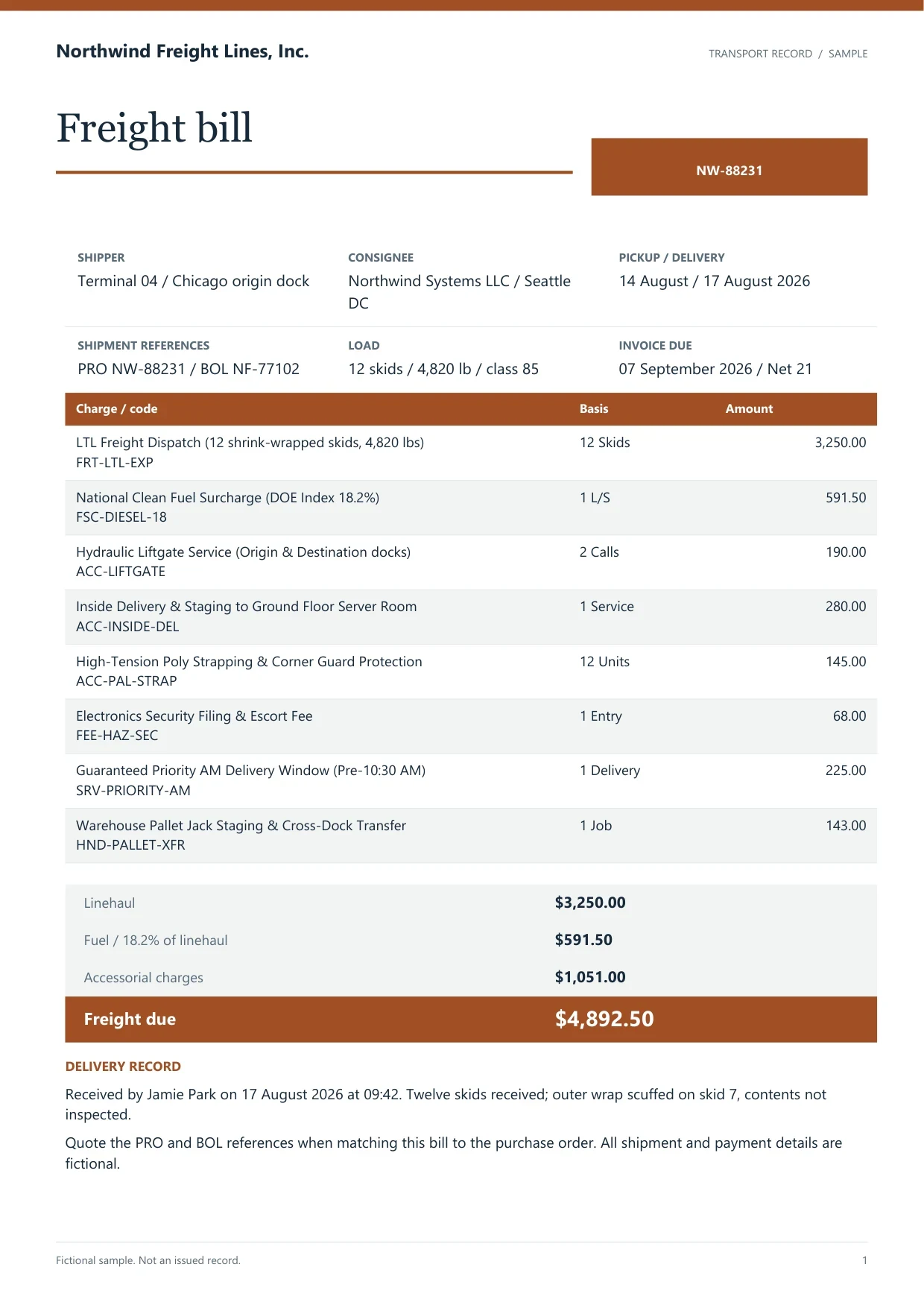
AI for logistics companies turns transport paperwork into checked tables. Dynamite Docs extracts draft fields from freight bills, delivery notes, and related PDFs or photos so operations and finance reviewers can verify shipment references, vehicle details when printed, and charge lines before handoff.
How logistics document extraction works: start with one lane or one carrier folder. Capture document type, carrier or transporter name, shipment or consignment reference, invoice or bill number, date, origin and destination when printed, vehicle number when shown, line description, quantity or weight when shown, currency, charge amount, and a reviewer source locator. Keep fuel surcharge, detention, and accessorial lines as separate rows when the bill prints them separately. For Indian GST movements that also need e-way bill fields, use the dedicated e-way workflow after the freight bill review. Dynamite Docs does not confirm portal status, decide whether an e-way bill was required, or settle carrier disputes. People review exceptions such as mismatched vehicle numbers, cropped totals, and unclear weight units before export.
Documents to prepare

Freight and carrier bills
Extract carrier identity, bill number, shipment reference, charge lines, currency, and total. Preserve accessorial descriptions instead of rolling them into a single unnamed fee.
Delivery notes and proof-of-delivery scans
Capture delivery references, item or package counts, and dates visible on the scan. Flag signatures or stamps that obscure amounts rather than guessing covered digits.

Supporting GST transport documents
When an Indian e-way bill accompanies the move, review GSTIN, invoice identity, vehicle, and consignment value in the e-way extraction workflow after the freight bill check.
Manual carrier entry vs generic OCR vs Dynamite Docs review
Illustrative comparison for a freight AP queue. Figures are fictional labels, not performance claims.
 Dynamite Docs
- Need
- Shipment reference
- Manual spreadsheet
- Retype from PDF
- Generic OCR export
- Often mixed with invoice no.

| Need | Manual spreadsheet | Generic OCR export | Dynamite Docs review |
|---|---|---|---|
| Shipment reference | Retype from PDF | Often mixed with invoice no. | Separate fields beside source |
| Accessorial lines | Often omitted | May merge into total | Keep surcharge rows distinct |
| Exception handling | Email threads | Silent guesses | Flag cropped or unclear values |
Review against the source
Dynamite Docs- Need
- Shipment reference
- Manual spreadsheet
- Retype from PDF
- Generic OCR export
- Often mixed with invoice no.
- Confirm carrier, bill number, and shipment reference before reviewing charge lines.
- Keep weight, package count, and currency labels attached to the printed unit.
- Compare line charges with the printed total and investigate missing accessorials.
- Route Indian e-way portal checks through your compliance process after source extraction.
Handoff steps
Dynamite Docs- 01Separate freight AP from compliance files
- 02Review references beside the scan
- 03Hand off accepted charge rows
Separate freight AP from compliance files
Choose freight bills for the payable register and keep e-way or GST supporting files in their own review queue with the fields those workflows need.

Review references beside the scan
Check vehicle numbers, dates, and charge lines against the original. Request a clearer copy when a stamp or fold hides a total.
Hand off accepted charge rows
Export Excel, CSV, or JSON for the AP or TMS import your team already uses. Verify document count and totals after import.
Export and handoff
Excel works for a freight exception queue. CSV or JSON supports a mapped import. Keep the original bill with the period’s AP records so a dispute can reopen the source.
Processing choices and allowances
Choose hosted AI, your own provider keys, or local Ollama on an eligible plan. Each successfully processed hosted page uses one PE. Free and Starter BYOK use the same PE allowance; Pro and Scale BYOK cost zero PE, with provider charges and limits still applying. Failed pages cost zero PE.
Check current plans, page limits, and capabilities and review storage and data-residency policies before processing sensitive records. Local model inference is a separate choice from browser-local file storage.
Workflow boundaries
- Extraction does not rate shop carriers, approve payments, or confirm GST portal status.
- Whether an e-way bill was legally required remains a compliance judgment outside this page.
Related guides
Extract e-way bill fields for Indian moves
Review GSTIN, vehicle, and consignment values from the printed bill.

AI for manufacturing businesses
Review supplier invoices and packing lists before plant handoff.

Operations document handoffs
Structure purchase orders and vendor records for the next team.
Accounts payable invoice preparation
Build a reviewed supplier bill register for payment workflows.

Browse role and industry solutions
Explore AI document extraction workflows by audience.
Questions about this workflow
Can Dynamite Docs confirm an e-way bill on the portal?
No. It extracts printed fields from the document you upload. Portal status and legal requirement checks stay with your compliance process.
How should multi-leg shipments be stored?
Keep one document register per bill or delivery note, and preserve the shipment reference that ties legs together in your TMS or workbook.
Which export fits a TMS import?
Use CSV or JSON when your TMS has an agreed column map. Use Excel when reviewers still need an exception sheet before import.
Does this replace freight audit software?
It prepares reviewed source rows. Carrier contract rates, lane audits, and payment approval remain in your existing freight or AP tools.