


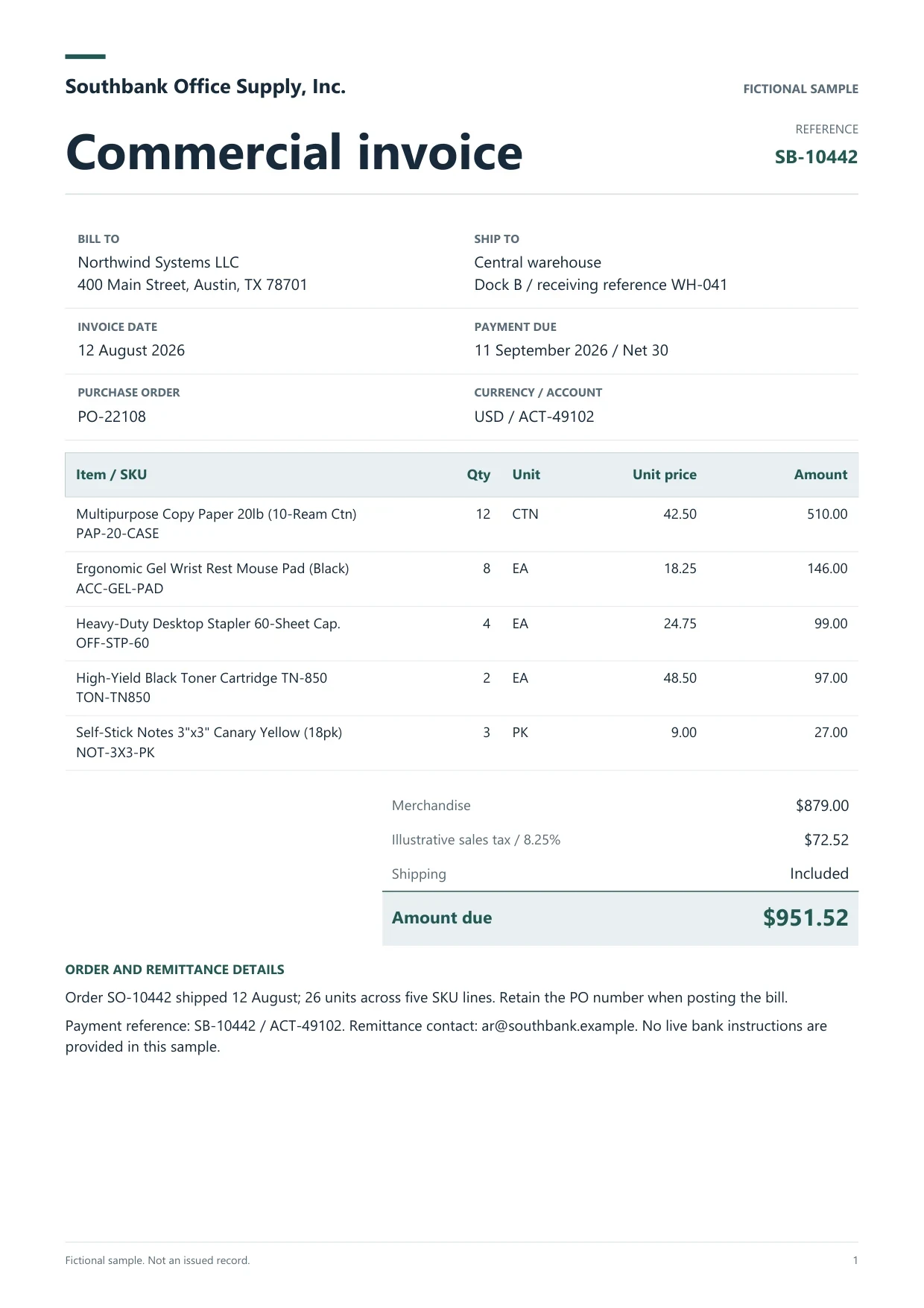
AI for manufacturing businesses prepares purchase and receiving paperwork for review. Dynamite Docs extracts draft fields and line items from supplier invoices, packing lists, and purchase orders so a reviewer can check quantities, unit rates, and totals beside the source before the rows move into AP or inventory workflows.
How AI for manufacturing document intake works: upload a representative invoice or packing list, keep the plant, supplier, and period visible, and define the columns the receiving team needs. Capture document type, supplier name, document number, date, currency, item description, quantity, unit, unit rate, taxable or line amount, and a reviewer-assigned source reference. Compare printed quantities with ordered quantities when both appear. Keep credit notes and debit notes as separate documents. Dynamite Docs reads what the file shows. It does not post stock movements, approve vendors, or decide accounting treatment. A person confirms exceptions such as unit mismatches, partial shipments, and unreadable batch codes before export to Excel, CSV, or JSON on your plan.
Documents to prepare

Supplier invoices
Capture supplier identity, invoice number, date, currency, line descriptions, quantities, rates, tax printed on the bill, and total. Keep freight or handling lines distinct when the invoice prints them separately.
Packing lists and delivery notes
Extract shipment references, item codes, delivered quantities, and units. Keep delivered quantity separate from ordered quantity so a shortage stays visible.
Purchase-order revisions
Record order reference, revision, item, unit, quantity, and price. A superseded revision can look complete while carrying the wrong instructions for the plant.
Manual entry vs generic converter vs Dynamite Docs review
Illustrative workflow comparison. Values are fictional. Choose the route that keeps source review and exception notes visible.
 Dynamite Docs
- Step
- Intake
- Manual retyping
- Type each line from PDF or scan
- Generic cloud converter
- Upload and accept first pass

| Step | Manual retyping | Generic cloud converter | Dynamite Docs review |
|---|---|---|---|
| Intake | Type each line from PDF or scan | Upload and accept first pass | Upload and keep source beside rows |
| Quantity check | Spreadsheet formulas after typing | Often totals only | Compare line qty, unit, and printed total |
| Handoff | Email a workbook | Download without review trail | Export checked Excel, CSV, or JSON |
Review against the source
Dynamite Docs- Step
- Intake
- Manual retyping
- Type each line from PDF or scan
- Generic cloud converter
- Upload and accept first pass
- Confirm document type, supplier, and order or invoice reference before reviewing lines.
- Compare quantity, unit of measure, and price basis. A price per case differs from a price per piece.
- Keep batch, lot, or serial text as printed when the plant needs it for receiving.
- Flag partial shipments, credit notes, and unreadable digits instead of guessing a balance.
Handoff steps
Dynamite Docs- 01Define the plant handoff schema
- 02Review one representative file
- 03Export accepted rows

Define the plant handoff schema
List the columns AP or inventory needs. Use separate schemas for invoices and packing lists, and state how missing units or blank rates should appear.

Review one representative file
Upload a multi-line invoice or packing list. Correct shifted columns and wrapped descriptions while the original page is visible.

Export accepted rows
Download Excel, CSV, or JSON within your plan. The receiving system should verify row count and document reference before posting or stocking.
Export and handoff
Excel supports a review queue with exception notes. CSV or JSON supports an agreed import mapping. Include the document reference and revision so later queries can find the source file.
Processing choices and allowances
Choose hosted AI, your own provider keys, or local Ollama on an eligible plan. Each successfully processed hosted page uses one PE. Free and Starter BYOK use the same PE allowance; Pro and Scale BYOK cost zero PE, with provider charges and limits still applying. Failed pages cost zero PE.
Check current plans, page limits, and capabilities and review storage and data-residency policies before processing sensitive records. Local model inference is a separate choice from browser-local file storage.
Workflow boundaries
- Extraction does not update inventory balances, approve purchase orders, or post supplier invoices.
- Unit conversions, landed-cost decisions, and GST or tax treatment remain with your existing process.
Related guides

Extract purchase-order line items
Check items, quantities, prices, and delivery details.

Prepare supplier bills for AP review
Build an invoice register with source-linked checks.

AI document extraction for logistics companies
Review freight bills, e-way details, and delivery paperwork.

Operations purchase-order handoffs
Structure revisions and vendor records before ERP handoff.

Browse role and industry solutions
Explore AI document extraction workflows by audience.
Questions about this workflow
Can this match invoices to purchase orders automatically?
No. It prepares reviewed fields from each document. Your purchasing or AP system owns three-way matching and approvals.
Do packing lists and invoices share one schema?
Keep separate schemas. Packing lists emphasize delivered quantity and shipment references. Invoices emphasize rates, tax printed on the bill, and payable totals.
Which plans support batch jobs for plant intake folders?
Durable jobs for stored files are available on Starter and above within current file and active-job limits. Check the pricing page for the plan you use.
Will extraction invent a missing unit of measure?
Leave unclear units blank or mark them as exceptions. Do not accept a guessed unit that changes stock or payment math.